Pregnancy & Baby Tracker App Store Screenshot Templates
Support expecting parents with reassuring visuals that combine guidance and practical daily tools.
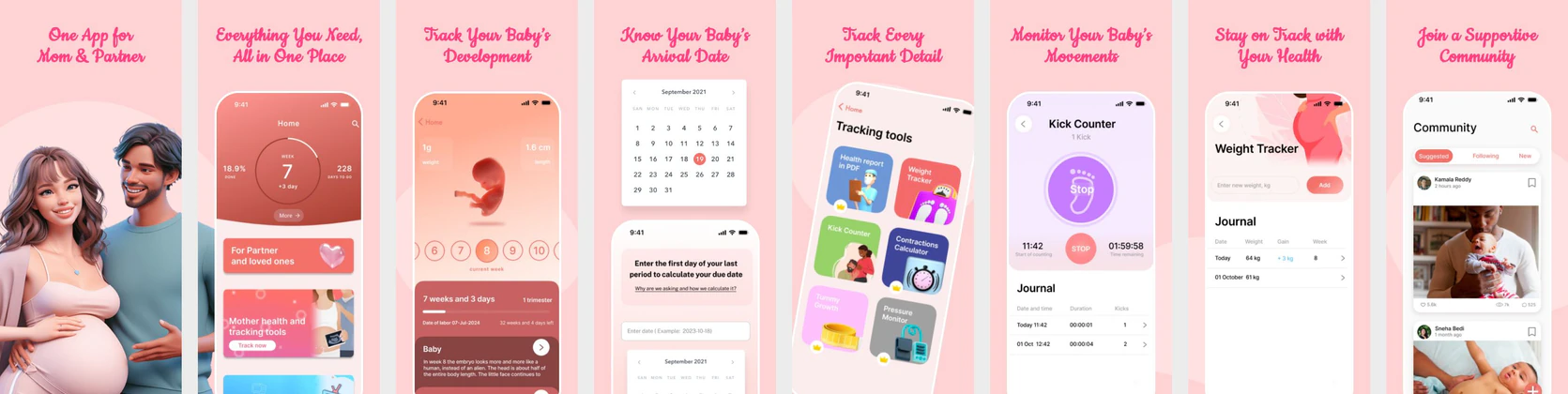
Capture the journey of pregnancy and parenting. Showcase week-by-week baby size charts, kick counters, and contraction trackers with warm, trusted designs.


 App Store Screenshot Templates

 Play Store Screenshot Templates
✨ App Mockups, Ads & ASO Marketing Graphics
ASO Guide: Designing Heartfelt Pregnancy & Parenting Listings
Pregnancy app listings should blend emotional warmth with clear utility. Start with week-by-week progress or baby development, then show symptom tracking, appointment reminders, and preparation guides. Users in this category value reassurance and relevance, so copy should feel specific and supportive rather than technical. Keep visuals easy to scan and avoid overwhelming early frames with too much medical detail.
Creative quality in this niche depends on clear sequencing and empathetic language. StoreMaven has reported up to a 33% download lift from optimized screenshot sets, and pregnancy products often benefit from milestone-led storytelling. Show how the app helps users understand what matters now and what comes next. Nakxi enables teams to adapt assets by trimester or parent persona while keeping a consistent, trusted visual style across both stores.
Pregnancy apps represent an emotional, life-changing journey. Screenshots must feel warm, soft, and highly trusted. Showcase week-by-week baby growth charts comparing the baby’s size to cute fruits, daily symptom logs, and kick counters.
Use pastel and warm tones (like soft pink, warm peach, or mint green) to convey comfort. Captions should focus on ease and excitement: 'Track Baby's Growth', 'Week-by-Week Milestones', or 'Expert Pregnancy Guides'.
Pregnancy teams generally run faster in Nakxi by organizing screenshot modules by trimester, then adjusting headline voice and guidance depth for each growth campaign.
Frequently Asked Questions
How do I display baby size indicators in pregnancy screenshots?
Feature screens that display size comparisons (e.g. 'Baby is the size of a lemon' with a fruit graphic) as they are highly popular and engaging for expecting parents.
Should I include community features in parenting screenshots?
Yes, showing a mock parent forum or group chat screen ('Ask Other Moms') highlights support, which is a key download driver for parents.
What should the first pregnancy screenshot communicate?
It should communicate reassurance and practical value together. A milestone view with clear week context often works best as an opener. This confirms category fit and immediately answers user curiosity. Avoid starting with secondary community or commerce screens.
Should pregnancy apps include educational screens?
Yes, one educational screen can strengthen trust if it is concise and actionable. Pair it with tracking utilities so the listing feels balanced. Avoid turning screenshots into long article previews. Users should still understand core app actions quickly.
How do I create pregnancy app screenshots with Nakxi?
Pick a pregnancy template from this page, open it in Nakxi's editor, swap in your UI captures, write outcome-led captions, and export App Store and Play Store sizes from one canvas. Most teams ship a first draft in under an hour without a design agency.
What screenshot sizes do pregnancy apps need in 2026?
Apple requires up to three iPhone display families (including 6.9-inch and 6.5-inch) per Apple's screenshot specifications. Google Play accepts 16:9 or 9:16 phone layouts between 320px and 3840px per side, as documented in Google Play listing best practices. Nakxi exports both store formats from a single design.