AI Localization · 40+ languages · RTL
App Store Localization
Translate App Store and Play Store screenshot captions and listing metadata in 40+ languages, including RTL. Clone the project once — export every language without redesigning each slide. Review cultural claims before you publish; Nakxi does not replace a native speaker.
- 40+ languages
- RTL layouts
- One locale on Free
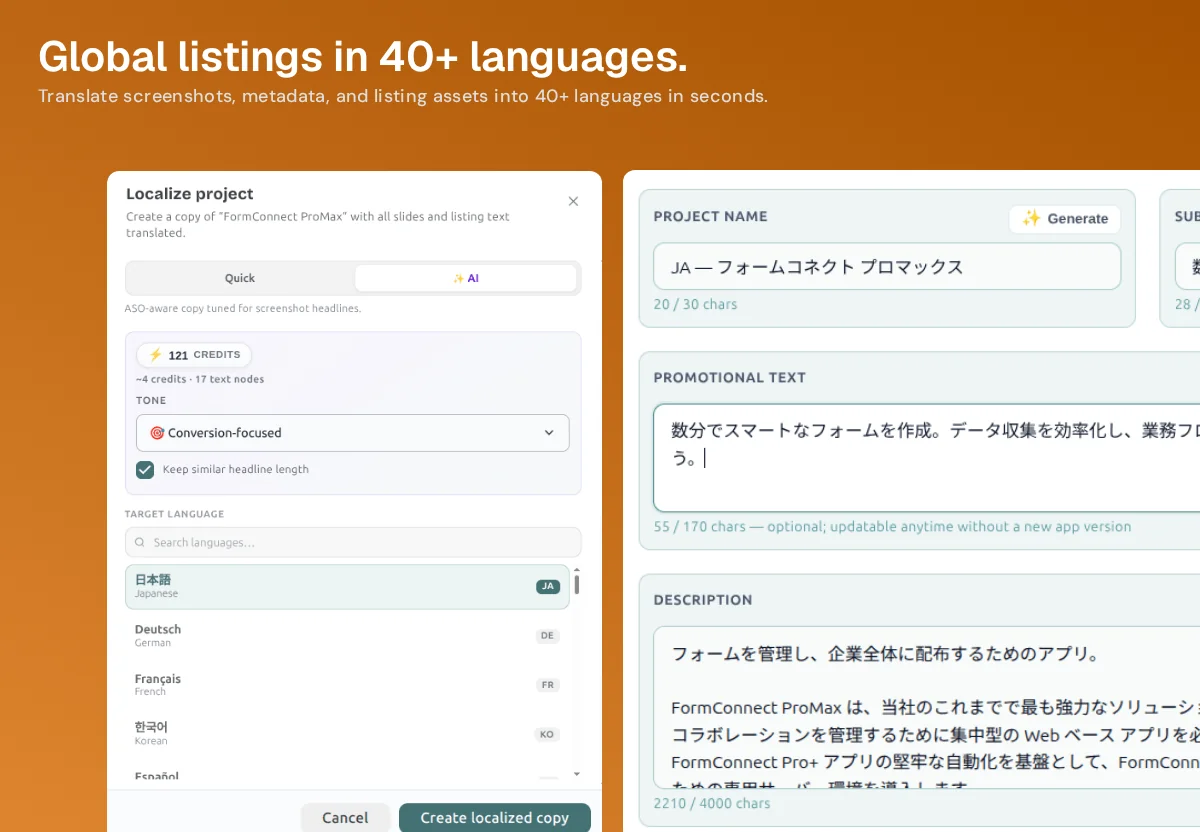
Screenshots + metadata
One listing, more storefront languages
Localization here is not a separate translation spreadsheet. You clone the Nakxi project, pick a language, and get screenshot headlines plus metadata fields in that locale — with the same character counters you already use on the English listing.
How a locale clone works
-
Clone the project
Create a localized copy of the listing you already designed. Screens, frames, and layout stay; text nodes become the new language.
-
Pick Quick or AI
Quick for a fast pass. AI for conversion-focused screenshot headlines with length control — credits scale with text nodes, not mystery tokens.
-
Choose the language
Japanese, German, French, Korean, Spanish, and 40+ others, including RTL. Each locale is its own project copy you can edit.
-
Export store sizes
Ship each language at the required App Store and Play Store dimensions. You are not rebuilding Figma files per market.
What you should still review
AI can keep headline length close to the source so captions do not overflow the frame. It cannot know whether a benefit lands in Japan the same way it does in the US, or whether a competitor name should stay in English. For RTL languages, Nakxi flips layout direction; you still check that screenshots and badges read correctly.
Write the source listing first with Metadata AI and the AI app screenshot generator (or Screenshot Studio), then localize. A longer playbook lives in the App Store localization guide .
Clone once. Ship more storefronts.
Try one locale free. Scale languages on Creator when the source listing is ready.
App Store localization FAQ
Clone, translate, review — then export the right sizes.
What does App Store localization include in Nakxi?
AI Localization clones a screenshot project into another storefront language and adapts screenshot captions plus listing metadata. Layouts stay; copy changes. It covers 40+ languages, including RTL for Arabic, Hebrew, and Persian.
What is the difference between Quick and AI translate?
Quick is a faster literal pass. AI translate is ASO-aware: it tunes screenshot headlines for conversion, can keep similar headline length, and uses credits based on how many text nodes you are localizing. Pick AI when captions have to stay short on the frame.
Do I still need a native review?
Yes for markets that matter. AI is a first draft for captions and metadata, not a substitute for a native speaker on claims, cultural fit, or trademarked names. Review Tier 1 locales before you publish.
Is localization on the free plan?
The free plan includes one localized locale so you can try the clone-and-export loop. Creator unlocks localization across 40+ languages. Exports keep the correct App Store and Play Store sizes per language.