Nakxi vs Screenshots.pro
Short answer: Screenshots.pro is a better fit when your team wants localization plus API-backed rendering inside CI/CD or release workflows. Nakxi is a better fit when the problem is screenshot quality, brand coherence, and building launch assets around the listing rather than automating template output.
This page is maintained by the Nakxi team and reviewed against public pricing, API docs, and product pages in May 2026. Because we build one of the products compared here, treat it as a transparent buyer guide rather than third-party editorial coverage.
How was this comparison reviewed?
This guide combines a live review of Nakxi's current workflow with public pricing pages, help docs, and product pages reviewed in May 2026. Because Nakxi is one of the products being compared, this page is intentionally transparent about authorship and tradeoffs rather than pretending to be a neutral third-party review.
- Screenshots.pro public pricing shows Basic free, Standard $19/month, and Extended $49/month.
- Public pricing and API docs show API access on the Extended tier.
- Public pricing includes localization on paid plans.
- Public API docs position the product around template rendering and developer workflows.
Competitor interfaces, pricing, and plan names can change quickly. Treat the facts above as a reviewed snapshot, and verify the latest details before purchase if your workflow depends on a specific feature.
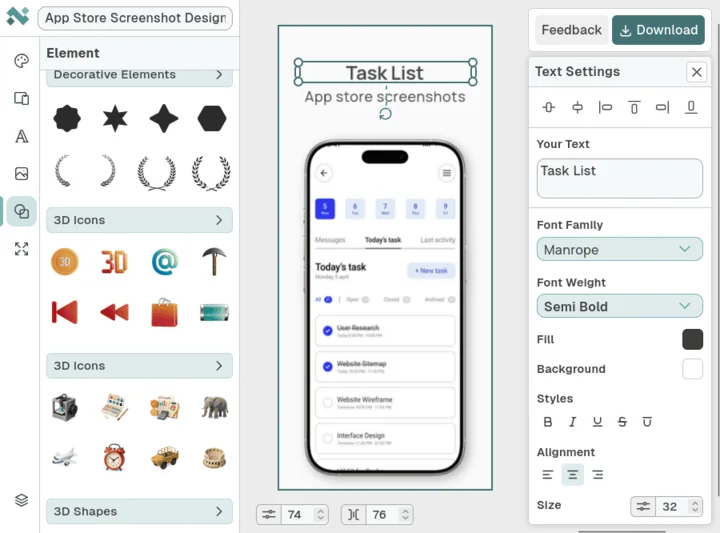
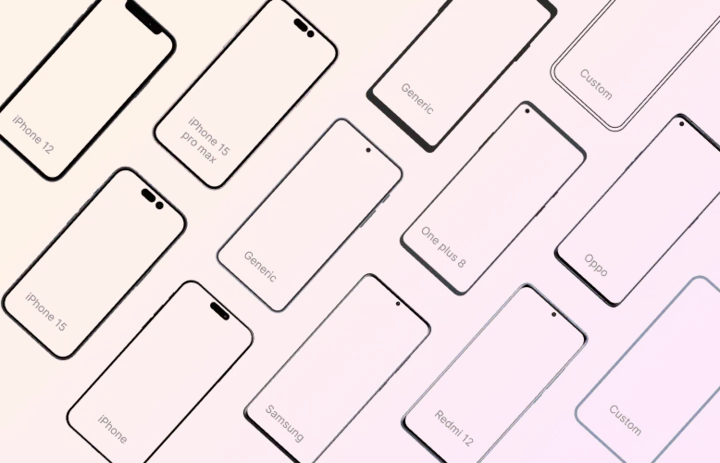
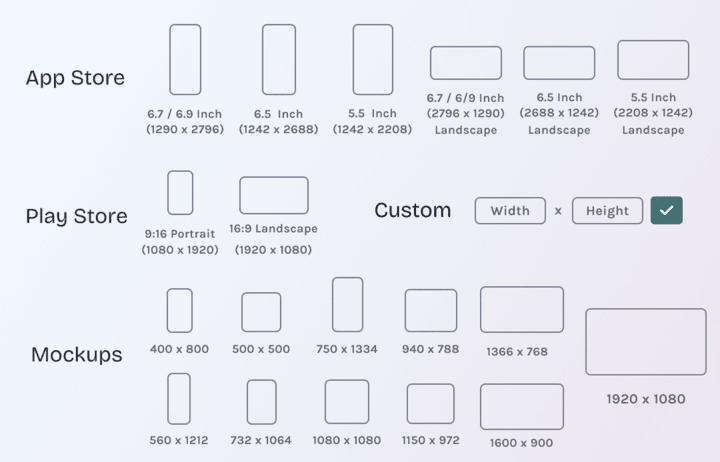
What does Nakxi's current workflow actually look like?
These screenshots are included to ground Nakxi-specific claims in visible product evidence rather than pure positioning copy.
Who should choose Nakxi or Screenshots.pro?
Choose Nakxi if:
- Teams creating full screenshot sequences for App Store and Google Play, not just template renders.
- Apps that care about message hierarchy, brand cohesion, and launch assets beyond the listing itself.
- Founders and marketers who want one visual workspace rather than a pipeline-first generator.
- Teams optimizing screenshot quality for conversion rather than rendering speed alone.
Choose Screenshots.pro if:
- Developers who want screenshot generation tied into CI/CD or repeatable release workflows.
- Teams that prefer localization and resizing through an automation-first system.
- Agencies or product teams that value API access and programmable output more than open-ended design control.
How do Nakxi and Screenshots.pro compare feature by feature?
| Capability | Nakxi | Screenshots.pro |
|---|---|---|
| Primary use case | Design-led screenshot systems and launch assets | Automation-led screenshot rendering and release workflows |
| Localization | Stronger fit for design-driven copy updates | Localization included on paid plans and suited to repeatable release pipelines |
| API / CI-CD | No CI/CD-first positioning | Extended plan includes API access for automated rendering |
| Pricing | Free plan; Nakxi Creator $19/month or $144/year | Basic free; Standard $19/month; Extended $49/month with API |
| Best fit | Teams optimizing screenshot quality and launch consistency | Teams optimizing automation, repeatability, and developer workflows |
Where is Screenshots.pro better than Nakxi?
Screenshots.pro is better if your bottleneck is automation. Its public API and pricing model clearly target teams that want screenshot rendering as part of release infrastructure rather than as a purely manual design step.
It is also a better fit when the team is developer-heavy and wants screenshot output driven by configuration rather than a more visual design workflow.
Where does Nakxi still win?
Nakxi wins when screenshot quality and brand coherence matter more than pipeline automation. If the screenshots are meant to tell a stronger story and sit alongside launch banners, promo graphics, or related assets, the design-first workflow usually creates more value.
That is why this comparison is best understood as release automation versus creative control, not simple feature count.
How should buyers think about localization and API access?
Screenshots.pro deserves credit here. Public pricing includes localization on paid plans, and the Extended tier adds API access. Those are real strengths and they matter for developer workflows.
Nakxi is stronger when localization is part of creative iteration rather than batch rendering. If the team is changing composition, emphasis, and surrounding assets while localizing, the design editor is a better match than a pipeline-first tool.
How should buyers think about pricing and team fit?
The pricing structure reflects the product's positioning: free for basic usage, $19 for paid creative output, and $49 for API-backed workflows. That makes sense if automation is what you are paying for.
Nakxi makes more sense when the problem is not rendering screenshots automatically but designing better screenshots in the first place. Its lower paid entry point fits design work better than infrastructure spend.
What should you check before switching from Screenshots.pro?
- Decide whether your bottleneck is creative quality or screenshot automation.
- Check whether API or CI/CD integration would save meaningful time for your team.
- Review if localization is a render-pipeline problem or a design-iteration problem.
- Compare whether launch banners and other supporting assets need to come from the same tool.
Which related resources help you evaluate the workflow more deeply?
These supporting pages connect the comparison to pricing, generator pages, and workflow guides so the buying decision is not based on one page alone.
Which other comparison pages should you read next?

FAQ
Is Nakxi a good Screenshots.pro alternative?
Yes. Nakxi is a strong Screenshots.pro alternative when your team needs more visual control and a broader creative workflow rather than an automation-first rendering system.
Does Screenshots.pro support localization?
Yes. Screenshots.pro includes localization on paid plans, so it should not be described as a manual-only workflow.
Does Screenshots.pro have API access?
Yes. API access is available on the Extended plan, which is one of the product's clearest differentiators for developer workflows.
Which tool is better for CI/CD screenshot pipelines?
Screenshots.pro is better for CI/CD-style screenshot pipelines because API access is part of its positioning and pricing model.
Which tool is better for screenshot design quality?
Nakxi is better for screenshot design quality when the team needs more canvas control, stronger brand expression, and supporting assets around the listing.
How does pricing compare between Nakxi and Screenshots.pro?
Nakxi starts with a free plan and Nakxi Creator from $19 per month. Screenshots.pro offers a free Basic plan, $19 Standard, and $49 Extended with API access.
When should I choose Screenshots.pro over Nakxi?
Choose Screenshots.pro when API access, automation, and repeatable screenshot generation matter more than creative flexibility and broader asset design.
What should I compare before switching from Screenshots.pro?
Compare whether your problem is design quality or automation, how important API access is, and whether your workflow also needs non-screenshot assets.