Nakxi vs AppMockUp
Short answer: AppMockUp is a better fit when you want a free, no-account device mockup tool and your needs stop at lightweight screenshot presentation. Nakxi is a better fit when you need App Store and Google Play screenshot systems, localization, supporting launch assets, and a workflow built for long-term ASO work.
This page is maintained by the Nakxi team and reviewed against public product pages, help docs, and AppMockUp's 2025 studio-rebuild notes in May 2026. Because we build one of the products compared here, treat it as a transparent buyer guide rather than third-party editorial coverage.
How was this comparison reviewed?
This guide combines a live review of Nakxi's current workflow with public pricing pages, help docs, and product pages reviewed in May 2026. Because Nakxi is one of the products being compared, this page is intentionally transparent about authorship and tradeoffs rather than pretending to be a neutral third-party review.
- AppMockUp publicly states that the studio remains free to use with no account required.
- AppMockUp's 2025 rebuild notes describe a much more capable editor than older reviews suggest.
- Public help docs show both auto-layout controls and manual positioning options.
- Localization is not a visible primary workflow on AppMockUp's public product messaging.
Competitor interfaces, pricing, and plan names can change quickly. Treat the facts above as a reviewed snapshot, and verify the latest details before purchase if your workflow depends on a specific feature.
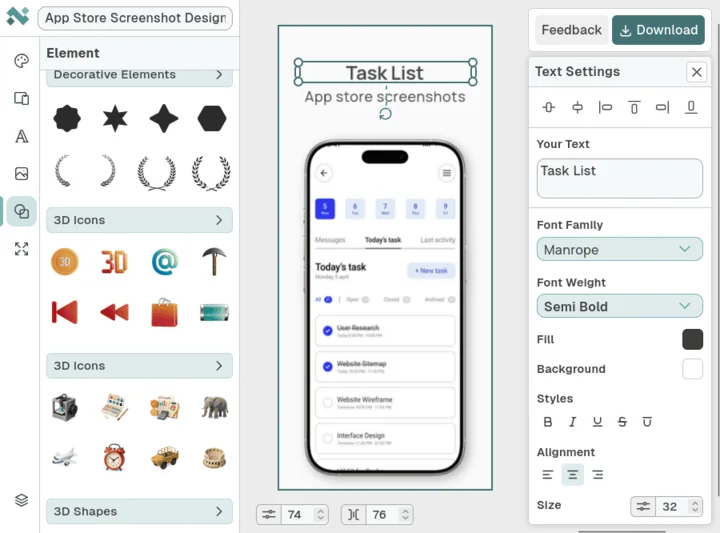
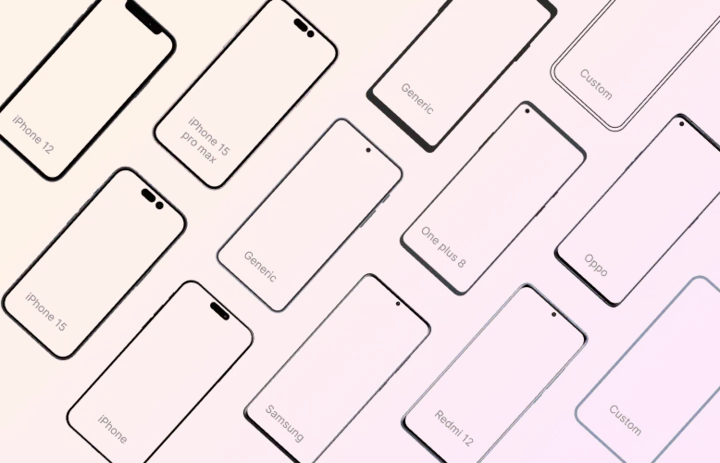
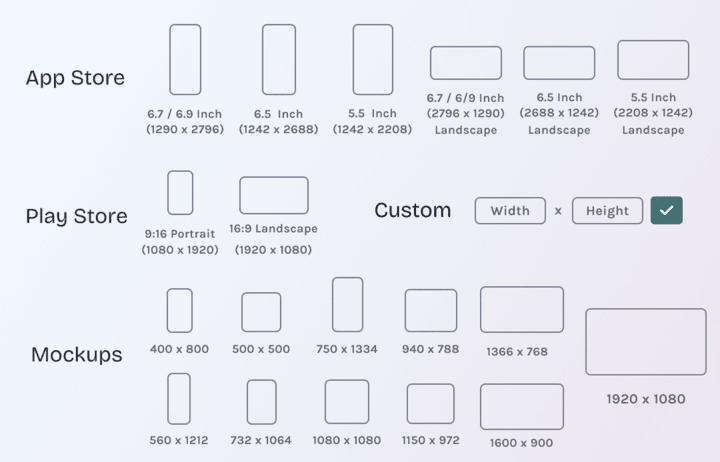
What does Nakxi's current workflow actually look like?
These screenshots are included to ground Nakxi-specific claims in visible product evidence rather than pure positioning copy.
Who should choose Nakxi or AppMockUp?
Choose Nakxi if:
- Apps building full screenshot carousels for App Store and Google Play listings.
- Teams that need stronger control over headline order, screenshot sequencing, and launch-ready supporting assets.
- ASO workflows where localization, ongoing iteration, and visual consistency matter over time.
- Founders who want one design system rather than a separate mockup utility and screenshot tool.
Choose AppMockUp if:
- Users who need quick device mockups for blog posts, decks, launch posts, or one-off presentation assets.
- Teams that value free access and no-account convenience over deeper workflow depth.
- Lightweight jobs where a full screenshot production system would be unnecessary.
How do Nakxi and AppMockUp compare feature by feature?
| Capability | Nakxi | AppMockUp |
|---|---|---|
| Entry cost | Free plan with a paid path for more workflow depth | Free to use and no account required |
| Editor model | Design-first canvas for store and launch creative | Rebuilt studio with auto-layout plus manual positioning controls |
| Localization | Better fit for recurring multi-locale screenshot work | No strong public localization workflow emphasis |
| Store workflow | Built for full App Store and Google Play screenshot systems | Best for mockups and lighter screenshot presentation jobs |
| Best fit | Ongoing ASO and launch workflow | Quick device presentation with minimal setup friction |
Where is AppMockUp better than Nakxi?
AppMockUp is better when cost and friction are the deciding factors. Free access with no account setup is a real advantage for developers who just need something usable right away.
It is also better when the job is mockup-first rather than workflow-first. If the output is a single device presentation for a post or deck, a free specialized tool can be the more rational choice.
Where does Nakxi still win?
Nakxi wins once the screenshots become part of a growth workflow rather than a presentation task. Localization, cross-store adaptation, repeated copy work, and broader launch assets all matter more than raw entry price in that situation.
That is why AppMockUp and Nakxi are not direct substitutes for every buyer. One solves immediate mockup needs well. The other is built for ongoing store creative work.
How much more flexible is AppMockUp after the rebuild?
More flexible than older descriptions suggest. Public rebuild notes and help docs show a more capable editor with auto-layout, manual positioning, and improved layer control.
That makes it unfair to describe AppMockUp as a basic wizard with no layout freedom. The more accurate description is a free mockup-first studio that still stops short of a broader ASO workflow.
How should buyers think about free access versus long-term workflow value?
AppMockUp's free model is a major benefit for early-stage developers, one-off launches, and lightweight presentation needs. It lowers friction and deserves to be acknowledged as a real competitive advantage.
Nakxi becomes easier to justify when screenshot performance is tied to installs, localization, and launch coordination. In that context, the question is not whether free is nice. It is whether free is enough for the work you need to do.
What should you check before switching from AppMockUp?
- Identify whether your main need is free mockups or a full screenshot workflow.
- Check whether localization and multi-store output are part of the release process.
- Review if the screenshots support real conversion work or just presentation.
- Decide whether banners, promos, and supporting launch assets should live in the same tool.
Which related resources help you evaluate the workflow more deeply?
These supporting pages connect the comparison to pricing, generator pages, and workflow guides so the buying decision is not based on one page alone.
Which other comparison pages should you read next?

FAQ
Is Nakxi a good AppMockUp alternative?
Yes. Nakxi is a strong AppMockUp alternative when you need more than quick mockups and want a full workflow for App Store and Google Play screenshot sets.
Is AppMockUp completely free?
Yes. AppMockUp publicly positions itself as free to use with no account required, which is one of its clearest real-world advantages.
Did AppMockUp add more layer control recently?
Yes. AppMockUp Studio's rebuilt editor offers more control than older reviews of the product suggest, including stronger positioning options.
Which tool is better for device mockups?
AppMockUp is better for quick device mockups and lightweight presentation assets where the main job is to show the app cleanly.
Which tool is better for App Store screenshots?
Nakxi is better for App Store screenshots because the workflow is built around multi-frame storytelling, repeated iteration, and broader screenshot strategy.
How does pricing compare between Nakxi and AppMockUp?
Nakxi offers a free plan and Nakxi Creator from $19 per month for teams that need the full AI ASO platform.
When should I choose AppMockUp over Nakxi?
Choose AppMockUp when you want a fast, free mockup tool and do not need localization, supporting asset formats, or a deeper store screenshot system.
What should I compare before switching from AppMockUp?
Compare whether your workflow is mockup-first or conversion-first, whether you publish across stores and locales, and whether a free utility is enough for the strategic work you need.