
App Store Custom Product Pages: The Complete ASO Guide for 2026
By Sagar Joshi
Published · Last updated
Your default App Store product page has to do too many jobs at once.
Someone typing budget planner wants a monthly envelope, categories, and “don’t blow rent.” Someone typing expense tracker wants receipts, categories, export. Bill tracker is due dates and late fees. Savings tracker is a goal bar. They might all be the same finance app. On one generic page, the first three frames and the promotional text try to say all of that, so they say none of it clearly.
App Store Custom Product Pages exist so you do not have to pick one story and hope. You keep one app record — one name, one subtitle, one icon, one description — and publish extra product-page versions that match a feature, a campaign, a season, or a keyword cluster. The rest of this guide is how to use that as an acquisition and conversion system, not as a pile of unused URLs.
This is not a screenshot-size tutorial. For frame-level layout, use the existing CPP screenshot strategy. Here the unit of work is the page: who it is for, which query or campaign it serves, what you measure, and when to leave it alone.
In this guide: what CPPs are · 2026 · vs default · ASO · search intent · 10 strategies · Apple Ads · vs PPO · build · examples · measurement · mistakes · CRO · assets · workflow · FAQ
What Are App Store Custom Product Pages?
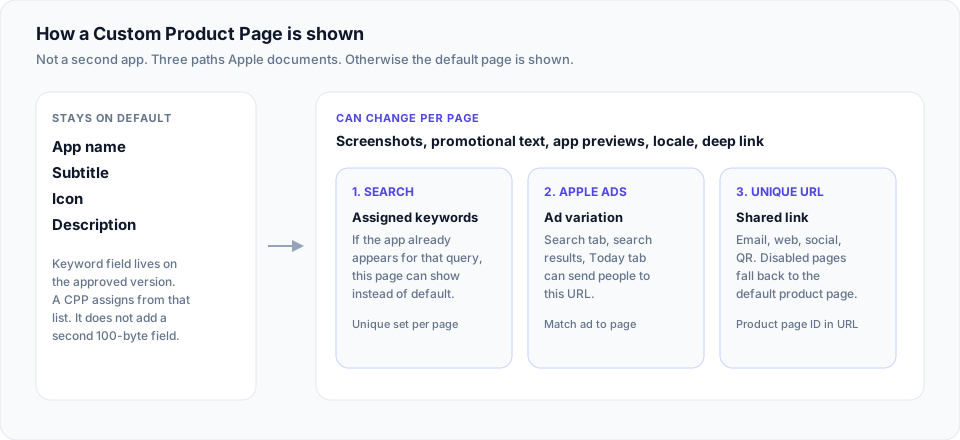
A Custom Product Page (CPP) is an extra version of your product page on the App Store for iPhone and iPad. Apple’s custom product pages overview is the source: you can publish up to 70 additional versions, vary screenshots, promotional text, and/or app previews, share each page with a unique URL, localize it, assign keywords so the page can appear in search instead of the default, and use it in Apple Ads. Apps on pre-order can use them too.
App Store Connect Help is more operational:
- Available on the store on iOS 15 / iPadOS 15 or later.
- People see a CPP if they follow its link, you send them there via Ads, or you assign keywords so it can show in search. Otherwise they get the default page.
- You start from a blank page or a copy of the default.
- You can add an app deep link (universal link or custom URL). On iOS 18 / iPadOS 18 or later, Open can land in a specific destination. Deep links go through App Review with the page. Apple asks you not to use URL shorteners.
- You assign keywords from the latest approved app version. You are not given a second 100-byte keyword field. You choose which of the keywords you already have should swap the search creative to this page. Do that per localization. Combinations should be unique to one page.
- The page is searchable only after it is approved and set visible. Disabled or deleted URLs redirect to the default page.
- Screenshots, previews, promotional text, keywords, and deep links need a review submission. You cannot edit those fields while the page is in review.
What a CPP is not: a second app, a way to hide a bad default page, or a Google Play Custom Store Listing. Play’s system can change name and icon for segments; Apple keeps identity on the default page. Creating your product page still treats name, subtitle, icon, and description as default-page work. If those are weak, fix them with title and subtitle practice and metadata drafts — a CPP will not paper over a vague name.
Think of CPPs as distribution of a matched store experience, not as “different screenshots.” Creatives are one input. Keywords, URL, Ads, localization, deep link, and analytics are the rest.
What Changed With Custom Product Pages in 2026?
The product is older than 2026. What you should not copy from old decks:
| Claim you may still see | Current Apple documentation |
|---|---|
| “Up to 35 custom product pages” | Connect Help and the marketing page: up to 70 per app. The older Tech Talk used 35; treat 70 as the live limit. |
| “CPPs are only for Apple Search Ads” | Unique URLs, search via assigned keywords, Ads (Today, Search tab, search results), and editorial placements Apple lists (Today / Games / Apps stories and collections). |
| “Keyword assignment always needs a full resubmission” | You can assign keywords in Connect at any time; the page must already be approved and visible to be searchable. Metadata (creatives, promo text, deep link) still goes through review. WWDC25 described keyword assignment as a search-surface control on existing pages. |
Keyword-in-search is the 2025–2026 shift that changes ASO practice. WWDC25 — What’s new in App Store Connect said you can assign keywords from the latest App Store version so that when the app appears for those queries, the custom page shows instead of the default. App Store search repeats that you can assign keywords to custom product pages so they appear for those terms rather than the default page, and that each combination should be unique.
That is not “CPPs now rank.” It is: if the app is already a result, you can choose which storefront the shopper sees.
Deep links (WWDC24 / Connect Help) close the loop after install: the page that sold “GlobeHop flights to Bali” can open that feature, not the generic home tab.
Analytics live under Acquisition → Product Pages. Apple’s CPP analytics help describes views, downloads, conversion, proceeds, average proceeds per paying user, and filters (territory, source, device). Connect Help also says App Store metrics appear after at least five first-time downloads.
Apple’s published average (on the custom product pages page, not a Nakxi test): developers see a 2.5 percentage point conversion increase on average when referring people to a custom product page, versus a 1.6% average conversion rate on default pages. Apple also writes that as a 156% relative increase. That is an aggregate, across apps that refer traffic to a CPP. It is not a guarantee, and it is not an organic-ranking claim.
Custom Product Pages vs the Default App Store Product Page
| Feature | Default product page | Custom Product Page |
|---|---|---|
| App name, subtitle, icon, description | Yes — this is the source of truth | No separate values; shoppers still see the app’s identity |
| Screenshots | Yes | Yes — you can replace the set |
| App previews | Yes | Yes — where you include them |
| Promotional text | Yes | Yes — per page |
| Keyword field (100 bytes) | Yes, on the version | You assign keywords from the latest approved version; you do not get a second field |
| Unique URL | Canonical product URL | Extra URL with a product page ID; disabled/deleted URLs fall back to default |
| Who sees it | Anyone browsing or searching when no CPP is assigned | Link, Ads, assigned-keyword search, or placements Apple documents |
| Campaign- or feature-specific story | One story for everyone | That is the point of a CPP |
| Localization | Yes | Yes — including keyword assignment per locale |
| Analytics | App Analytics for the app / default page | Per-page dashboard plus comparison to default |
| App Review | Version + metadata | Page metadata (and deep link) reviewed; can ship without a binary update |
If a row is blank in your brief, do not invent Play-style audience pickers. Apple does not document “show this CPP to parents aged 25–34.” You choose the path: URL, ad, or keyword assignment.
Why Custom Product Pages Matter for ASO
Keep four words apart.
Visibility — whether the app appears for a query or in an ad. Driven by Apple’s search factors (text relevance and user behavior), Ads bids, and editorial. A CPP does not create a second app to rank.
Relevance — whether the page they see matches the query or the ad they tapped. Keyword assignment and message match live here.
Traffic — impressions and page views on that URL or search creative.
Conversion — downloads (and re-downloads, in Apple’s conversion definition from the Tech Talk) divided by people who saw the page.
ASO in the broad sense is all four. CPPs are a relevance and conversion lever, plus a measurement split by source. They are a weak visibility lever except insofar as a better-matched search result might earn more taps (Apple does not publish that as a ranking feature). They are not a substitute for indexed metadata on the default version.
Where they help ASO work:
- Search intent. “Budget” and “bills” can show different first frames and promo text when you assign those keyword groups to different pages.
- Message match. Paid and email traffic stop landing on a generic carousel.
- Localization. Same intent, different market proof (currency, tax year, sports league) without rewriting the global default.
- Learning. Per-page conversion and downstream proceeds tell you which promise is worth putting on the default page later.
Where they do not help: stuffing 70 near-duplicate pages, assigning overlapping keywords, or expecting Apple to rank you higher because you clicked Publish.
Search Intent and App Store Product Pages
Use a personal finance app as the running example. Related queries, different jobs:
| Query | Likely intent | What the page must confirm in seconds |
|---|---|---|
| personal finance app | Category browse | Breadth: budget + track + bills, without looking like five unrelated tools |
| budget planner | Plan spending before it happens | Envelopes, categories, month view |
| expense tracker | Log what already happened | Receipt capture, categories, export |
| bill tracker | Avoid late fees | Calendar, amounts, reminders |
| savings tracker | Progress to a number | Goal, date, remaining |
The default page should win the category query and remain honest. CPPs take the job queries — if those keywords are in your approved list and the app actually does the job. If it does not do bills, do not assign bill tracker. That is a conversion and a guideline problem (accurate metadata, 2.3), not an ASO trick.
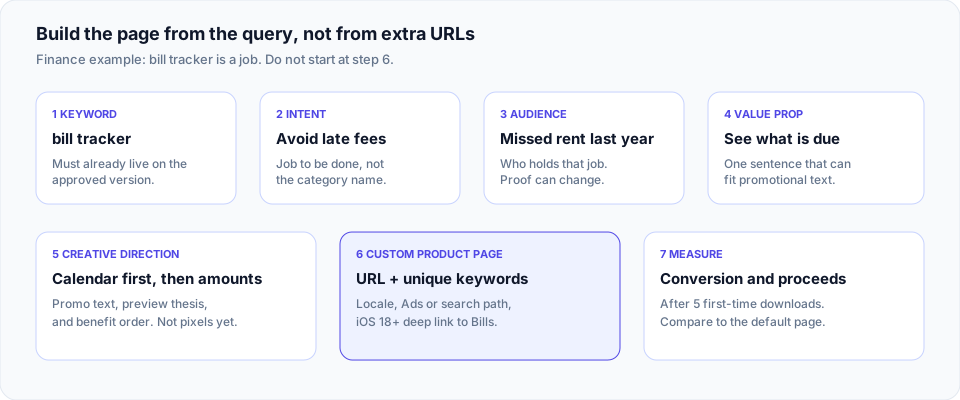
Work the chain left to right. Most failed CPPs start on the right (“we need more pages”) and never name the intent.
For keyword grouping before you touch Connect, competitor keyword gaps is the research companion. Localization of the same chain is in the 2026 localization guide.
10 Custom Product Page Strategies You Can Use
Each item is a hypothesis. Do not run all ten.
1. Feature-based. One install reason that is easy to miss on the default page (notes app → audio transcription; deep link into that flow). Measure conversion vs default and whether those users actually use the feature.
2. Audience-based. Same binary, different buyer (team chat for remote startups vs school clubs). Measure conversion and early retention; a campus page that installs and churns is not a win.
3. Keyword-intent. Distinct jobs you already appear or bid for (the finance table). Non-overlapping keyword sets. Measure search conversion per page.
4. Apple Ads pages. The ad group already promises a feature; the store page continues that sentence. Measure Ads conversion and CPI, then proceeds in Analytics.
5. Seasonal. The product actually changes (tax, a tournament, a holiday pack). Apple’s CBS Sports example. Kill or refresh when the season ends.
6. Use-case. Same feature, different job (“receipts for freelance taxes” vs “split rent”). Measure paying users, not only downloads.
7. Feature launch. Ship a URL from What’s New, email, and social without rebuilding the whole default carousel. After the window, promote the feature to the default page or drop it.
8. Locale as strategy. UK bills (Direct Debit, GBP) is not a US page with translated strings. Assign keywords per localization. Measure by territory.
9. Off-store landers. Unique URLs in email, web, influencers, QR. Apple describes this (a team in an email). Check whether your MMP parses the product page ID.
10. High-intent. Brand and conquest traffic, or “open X after install.” Skip category education; measure trial-to-paid and proceeds per paying user.
Run the two intents that already have traffic and a sentence the default page cannot hold.
Custom Product Pages for Apple Ads
Apple’s custom product pages page and Ads support docs describe the same chain: ad message, product page, expectation, install, then a deep link on iOS 18 or later.
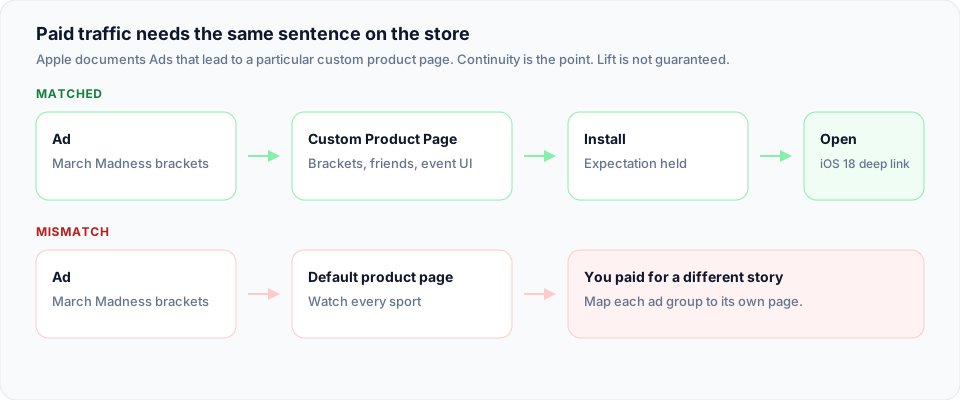
If the ad says “March Madness brackets” and the page still says “Watch every sport,” you paid for a mismatch. Custom pages let Search results ad variations and Today tab ads use assets from an approved CPP. Apple notes that Today tab ads need a CPP with a minimum number of images that meet Ads creative rules (the Tech Talk specified at least four portrait or five landscape images for Today). Confirm the current Ads creative spec in Ads Manager before you shoot.
For search campaigns, map ad groups to pages, not one CPP to the whole account. Photo-related keywords → photo CPP (Apple used Baidu’s visual-search features as a Tech Talk example). Furniture vs fashion vs electronics → separate variations.
What you can say: message continuity is why the feature exists. What you cannot say: that Nakxi or anyone can promise a 10% CPA drop. Apple’s Tech Talk cited Baidu and other advertisers’ results in their campaigns. Steal the structure, not the percentages.
Deep links belong here: the person who tapped “Bali packages” should not land on a blank home feed. Test the URL in Notes, as Connect Help suggests, before you spend.
Custom Product Pages vs Product Page Optimization
Product Page Optimization is a test. You run up to three treatments against the original default page. Eligible users on recent iOS are randomly split. You can test icons, screenshots, and app previews (Analytics help also mentions descriptions). An alternate icon in a treatment also appears on the device if they install. Results show impressions, conversion, relative lift, and confidence. You then apply a winner to everyone.
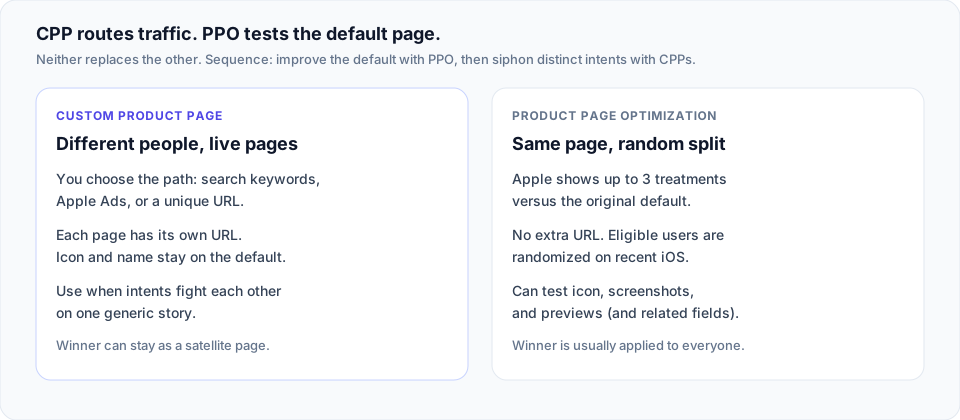
| Custom Product Page | Product Page Optimization | |
|---|---|---|
| Job | Serve different people different live pages | Find a better default via a controlled test |
| How traffic is split | You route: URL, Ads, keywords | Apple randomizes a percentage |
| Unique URL | Yes | No — treatments are the same product page |
| Icon / name / description | Icon and name stay default | Icon (and related treatments) can be tested |
| When to use | Distinct intent or campaign | One audience, several creative bets |
| Winner | May stay as a satellite page forever | Usually merged into the default |
Neither is “better.” A common sequence: PPO improves the default story; CPPs siphon the intents that still fight each other. Using a CPP as a sloppy A/B test (50% of emails to page A, 50% to B with no design) is possible but is not PPO: you lose Apple’s randomization, icon testing, and confidence UI.
How to Build a Custom Product Page Around Search Intent
Step 1 — Name the intent. One job. “Help me not miss the rent.” Not “finance.”
Step 2 — Group keywords. Only terms already in (or about to be in) the approved keyword field, title, or subtitle. Unique set per page. Drop synonyms that belong on another page.
Step 3 — Audience. Who holds the job? Freelance designer vs household of four. That changes proof, not necessarily the binary.
Step 4 — Value proposition. One sentence you could print on promo text. If you need a paragraph, you do not have a page yet.
Step 5 — Creative concept. Promo text, preview thesis, and the order of benefits. This is direction, not pixel specs. Production can wait.
Step 6 — Acquisition source. Search assignment, Ads ad group, email, or all three. If you cannot name the source, you are decorating.
Step 7 — Launch. Submit the page. Set visible. Assign keywords after it is approved if you did not include them in the submission workflow you use. Add the Ads variation. Add the deep link if the OS bar is iOS 18+.
Step 8 — Measure. Wait for five first-time downloads before you over-read App Store metrics. Look at conversion and proceeds / retention.
Step 9 — Iterate. Change one thing: keyword set, promo text, or the lead story. Or kill the page.
Example, compressed: intent = bill reminders; keywords = bill tracker, bill reminder (unique to this page); audience = people who got a late fee last year; proposition = “See what’s due this week”; source = search + one Search Ads ad group; deep link = Bills tab; success = conversion ≥ default and week-1 return to Bills.
Custom Product Page Examples
Apple’s Make the most of custom product pages Tech Talk is the public case file. Numbers below are Apple’s, from that talk, for those apps’ situations. They are not benchmarks you inherit.
CBS Sports — seasonal. Default page: evergreen live sports and scores. CPP: March Madness, brackets, play with friends, UI that matched the event. They measured conversion and tournament signups year over year. Apple: 20% conversion uplift on the custom page and 48% improvement in March Madness signups YoY. Lesson: seasonal pages should change the job, not only the palette, and you should pick a product metric (signups), not downloads only.
State of Survival (FunPlus) — audience. Default: broad game fantasy. CPP: character-forward screenshots for an RPG-leaning segment, used in more focused marketing (Apple describes working with ironSource on that segment). Apple: 33% higher conversion and 14% lower CPI versus their referral setup. Lesson: the page rode already-targeted traffic. The CPP did not invent an RPG audience by existing.
Baidu — Ads message match. Ad variations from CPPs aligned to keyword themes (for example photo/object features). Apple reported a 10% conversion-rate improvement for that optimized ad/page pairing in the talk. Lesson: Ads creative and store creative are one system.
If you need a still-current limit reminder: that talk’s “35 pages” is stale. Connect Help says 70.
How to Measure Custom Product Page Performance
Apple’s Analytics help is the checklist. None of these, alone, is “ASO success.”
| Metric | What it can tell you | What it cannot |
|---|---|---|
| Impressions | Whether search, Ads, or browse is actually showing the page | Whether the message was understood |
| Product page views | Who opened the storefront | Quality of those users |
| Downloads / total downloads | Volume from that page | Whether they stay or pay |
| Conversion rate | Efficiency of the page for people who saw it | Ranking, or that a high CR cheap audience is valuable |
| Source type | Search vs Ads vs other | Full paid creative attribution (use Ads + MMP too) |
| Territory / device | Where the page works | That you should clone it blindly |
| Subscriptions, proceeds, average proceeds per paying user | Downstream value Apple exposes | Full LTV if you sell off-store |
| Retention views Apple provides | Whether those downloaders behave | Causation without a holdout |
Connect Help: metrics after five first-time downloads. Below that, you are looking at noise.
Compare each CPP to the default, same date range, same territory when you can. A page that converts higher but brings half the proceeds per paying user is a different product decision than “the CPP won.”
Common Custom Product Page Mistakes
- No distinct intent. Two pages that a user could swap without noticing.
- New art, same sentence. Promo text still generic; only the gradient changed.
- Mismatched traffic. Brand campaign URL on a niche feature page, or the reverse.
- Seventy hypotheses. Operational cost without a question you will answer.
- Skipping localization. English promo text on a JP-assigned keyword set.
- Downloads as the north star. Especially for subscriptions.
- Treating CPP as ASO. Weak title and keyword field, 12 CPPs as camouflage.
- Overlapping keyword assignment. Apple tells you to keep combinations unique so the right page shows.
- No experiment log. You cannot remember why page 7 exists in six months.
- Zombie seasonal pages. March Madness creative in July, still assigned to search.
Bonus: using a CPP to claim a feature the binary does not have. That is listing accuracy, not growth.
Custom Product Pages and App Store Conversion Rate Optimization
Store CRO is message match under a time limit. Search results already show rating, name, subtitle, and up to three screenshots or a preview (App Store search). The CPP you assigned is what fills those screenshot slots. If those three frames do not confirm the query, the tap never happens — or the product page bounces.
On the page itself: one job in promotional text, proof in the preview, honest pricing if the feature is paid (still governed by Apple’s subscription and metadata rules on the app, not a magic CPP exception), and a deep link that keeps the promise. Friction is a story that resets after install.
Nakxi does not set your conversion rate. It shortens the part where each intent still needs its own promo line, localized caption set, and export into Connect. The ASO platform is the workflow wrapper; Metadata AI and localization are the copy path; screenshot tools are only for the frames when you get there.
Creating the Creative Assets for Custom Product Pages
A serious CPP program is a variant problem: different lead promise, different proof order, different locale, sometimes a campaign lockup. Manually rebuilding that in a generic canvas is how programs stall at two pages.
Nakxi is an AI-powered ASO platform for listing research, metadata, store creatives, localization, and publishing — the assets behind those variants, not a replacement for App Store Connect.
When you actually need frames, the App Store screenshot generator and templates keep sizes honest. AI screenshot generation is for first drafts of a new promise, not for inventing UI the app does not have. Metadata AI is for promo-adjacent copy and default-page metadata that CPPs cannot override. Localization is how a bills page in DE does not ship US tax language. None of that is “70 pages by Friday.” It is how you do two intents without a design bottleneck.
Need several variants without rebuilding every layout from scratch? Use the ASO workflow and export into Connect the way you already submit a CPP for review.
A Practical Custom Product Page Workflow
Research (queries, Ads terms, support tickets)
  → Keyword grouping (unique sets from the approved field)
    → Audience + job
      → Page hypothesis (one sentence + success metric)
        → Creative concept (promo + story order + deep link)
          → Build in Connect + assets
            → Review → visible → assign keywords / Ads / URLs
              → Measure (CR + downstream)
                → Iterate, promote to default, or kill
Custom Product Page Checklist
- Target audience named in one line
- Search or campaign intent named in one line
- Keyword group listed; no overlap with other CPPs; exists on the approved version
- Unique value proposition fits promotional text
- Default name/subtitle still honest for this intent (metadata audit if not)
- Creative direction matches the source (search / Ads / email)
- Locales actually rewritten, not only translated
- Deep link tested (iOS 18+) if you use one; no shortener
- Page submitted, approved, visible
- Ads variation or unique URL connected
- Analytics compared to default after five first-time downloads
- Downstream metric chosen (proceeds, retention, or your own)
- Kill/refresh date for seasonal pages
- Decision logged
Frequently Asked Questions
Do I need 70 pages? No. Two or three intents with real traffic beat a graveyard of URLs. Seventy is a ceiling.
Will a CPP fix ranking? Not by itself. Ranking is still the app. A CPP changes what people see when you already appear.
CPP or PPO first? One audience, several visual bets → PPO. Two audiences that fight on one page → CPP.
Play Store? Custom Store Listings are a different system. See the CPP / CSL screenshot piece.
Final Takeaway
Custom Product Pages are not a creative toy. They are how you align:
keyword intent → audience → message → creative → acquisition source → store experience → measurement
without forcing every shopper through one generic page. Apple gives you the slots, the keyword swap, Ads, localization, deep links, and Analytics. You still have to pick an intent, keep combinations unique, and judge pages on conversion and what those users do next.
The default product page remains the spine: name, subtitle, icon, description, and the story you are willing to show everyone. CPPs are the branches. If you want help producing the listing assets those branches need, start on nakxi.com — then publish the page in App Store Connect, where Apple actually hosts it.