
App Title & Subtitle ASO Guide (2026)
By Sagar Joshi
Published · Last updated
Most App Store Optimization conversations in 2026 start with screenshots, icons, and preview videos. That makes sense — StoreMaven’s engagement research shows users spend roughly seven seconds on a listing before installing or leaving, and Splitmetrics behavior data indicates only about 2% of users tap “Read More” on a product page.
But discovery happens before that seven-second judgment. Store search engines read your app title and subtitle (or short description on Google Play) first. Those fields decide whether you appear for high-intent queries — and whether the user who lands on your page already understands what your app does.
According to Apple Search Ads, search drives roughly 65% of iOS app discoveries. Your metadata is the front door to that traffic. This guide explains how Apple and Google index title and subtitle copy differently, what the published research actually supports, and how to build a metadata workflow that pairs with your screenshot and visual ASO strategy.
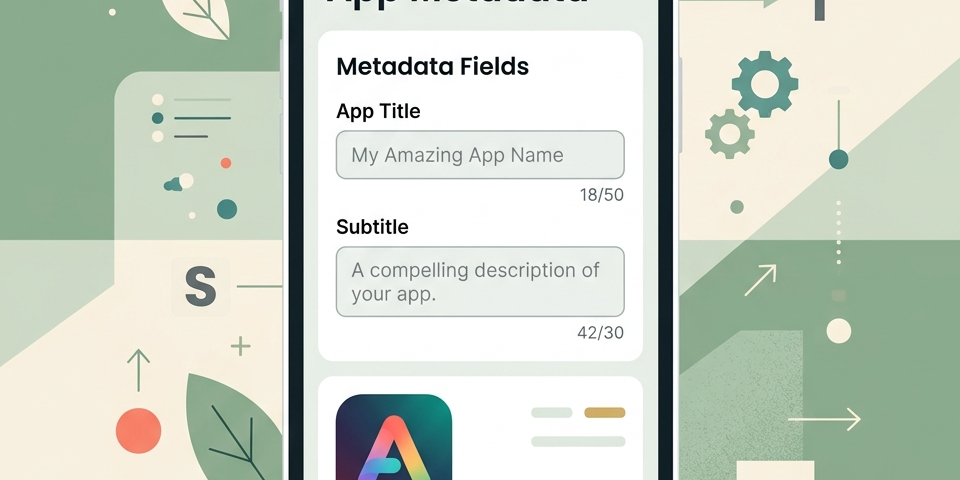
Note on the hero image: The subtitle field showing
42/30is intentional — it demonstrates what happens when copy exceeds Apple’s hard character limit. Anything past 30 characters will not save in App Store Connect.
Table of Contents
- Why Title and Subtitle Matter More Than Most Teams Think
- Character Limits Cheat Sheet: Apple vs Google Play
- How Apple Indexes Title, Subtitle, and Keywords
- How Google Play Indexes Title and Short Description
- The iOS Keyword Field: Tactics Most Teams Skip
- Promotional Text vs Subtitle on Apple
- Google Play Long Description and Metadata Synergy
- What the Data Actually Says About Metadata Impact
- The Conversion Loop: Rankings and Installs Feed Each Other
- 10-Step ASO Metadata Optimization Framework
- Worked Examples: Metadata Teardowns (Illustrative)
- Common Metadata Mistakes That Waste Characters
- How to Measure Metadata Changes Without Guessing
- Align Metadata With Screenshots and Visual ASO
- Frequently Asked Questions
- Conclusion
Why Title and Subtitle Matter More Than Most Teams Think
App store metadata serves two jobs at once:
- Indexing — telling the store which search queries your app is relevant for.
- Conversion — telling the human reader why they should install.
Your title and subtitle are the only metadata fields visible in search results on both major stores. A user searching "budget tracker" sees your app name and subtitle before they ever open your product page. If those fields do not match intent, you lose the tap — even with a strong rank.
That dual role is why metadata optimization is not a one-time launch task. ASO trends in 2026 show stores weighting fresher creative signals, review velocity, and listing conversion more heavily than they did even two years ago. Metadata is the text layer of a living system — and it should stay aligned with your screenshot messaging as you iterate.
Character Limits Cheat Sheet: Apple vs Google Play
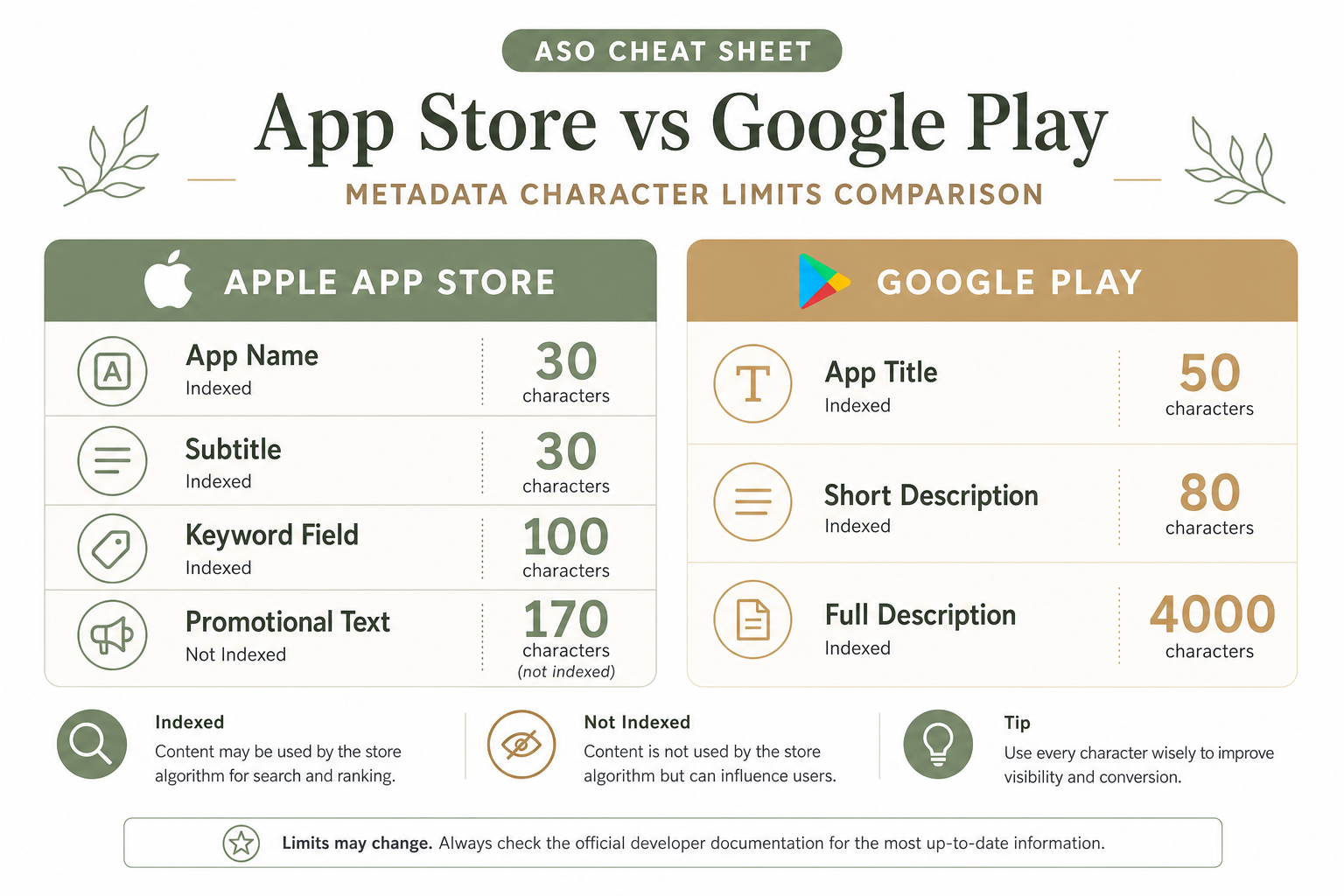
Before you write a single word, internalize the hard limits. Exceeding them simply blocks submission or truncates copy in search.
| Field | Apple App Store | Google Play |
|---|---|---|
| Primary name / title | 30 characters | 50 characters |
| Subtitle / short description | 30 characters | 80 characters |
| Hidden / extended keywords | 100-character keyword field | Up to 4,000-character full description |
| Promotional copy | 170-character promotional text (not indexed) | — |
Official references: Apple product page metadata and Google Play listing best practices.
Practical takeaway: iOS forces ruthless brevity. Android gives more title room but still rewards clarity over stuffing. On both platforms, the highest-impact terms belong in the title first, then the subtitle or short description.
How Apple Indexes Title, Subtitle, and Keywords
Apple’s App Store search does not work like web SEO. It uses a bounded set of metadata fields with a combinatorial indexing model — words from your app name, subtitle, and keyword field combine to form searchable phrases.
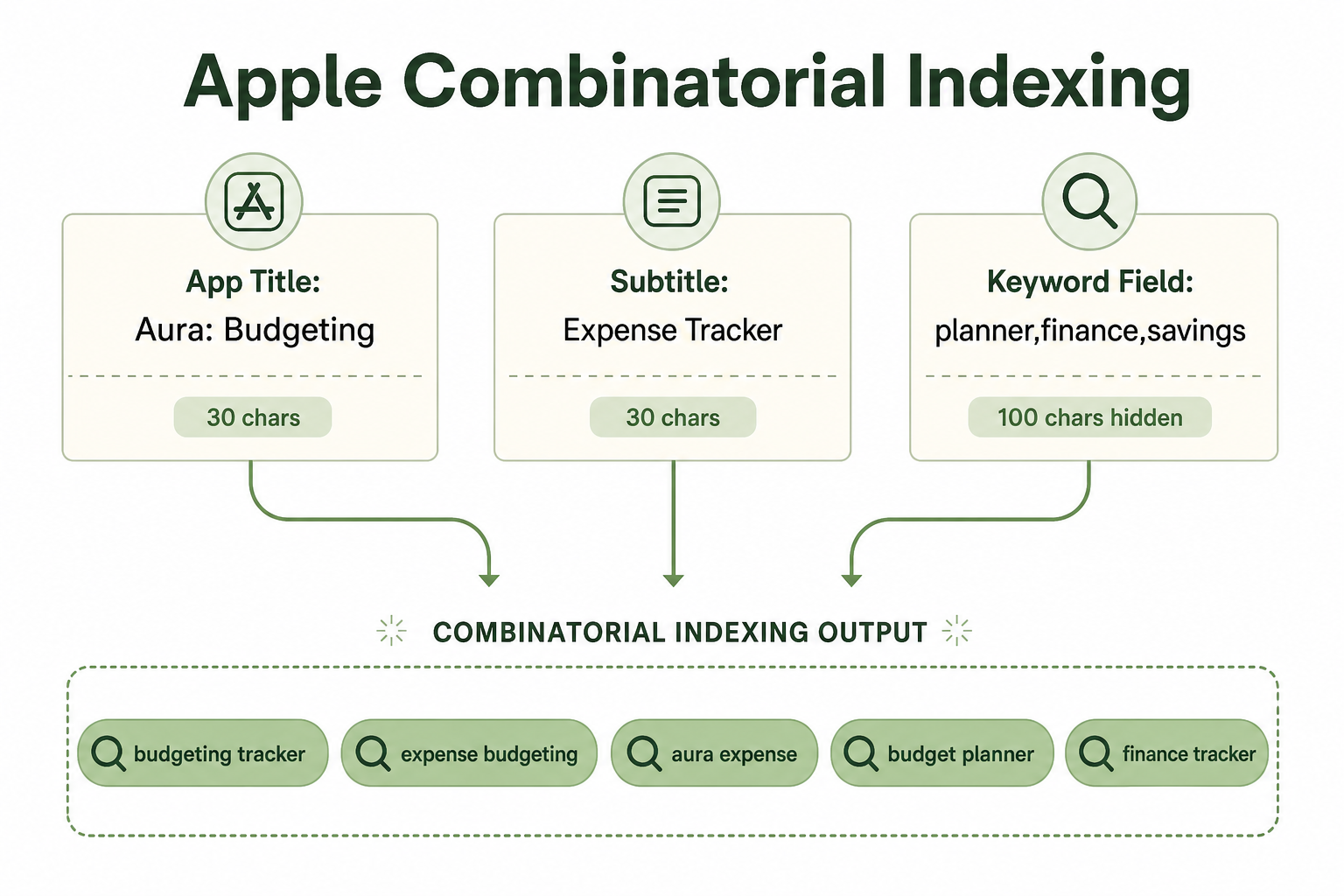
The three indexed text fields
- App Name (Title) — 30 characters, visible everywhere.
- Subtitle — 30 characters, visible on the product page and in search.
- Keyword Field — 100 characters, comma-separated, hidden from users.
Combinatorial indexing in practice
If your title is Aura: Budgeting and your subtitle is Expense Tracker, Apple can index combined phrases such as:
budgeting trackerexpense budgetingaura expense
You do not need every phrase spelled out in one field. You need non-overlapping, high-value words distributed across fields so the engine can combine them.
Title weighting: what we know and what we do not
Apple does not publish official keyword weighting. ASO practitioners widely report that terms in the app name carry more ranking influence than the same terms in the hidden keyword field — a heuristic many teams treat as roughly 2x to 3x stronger, not a confirmed multiplier. Plan accordingly: put your primary category keyword in the title when possible, secondary terms in the subtitle, and long-tail coverage in the keyword field.
How Google Play Indexes Title and Short Description
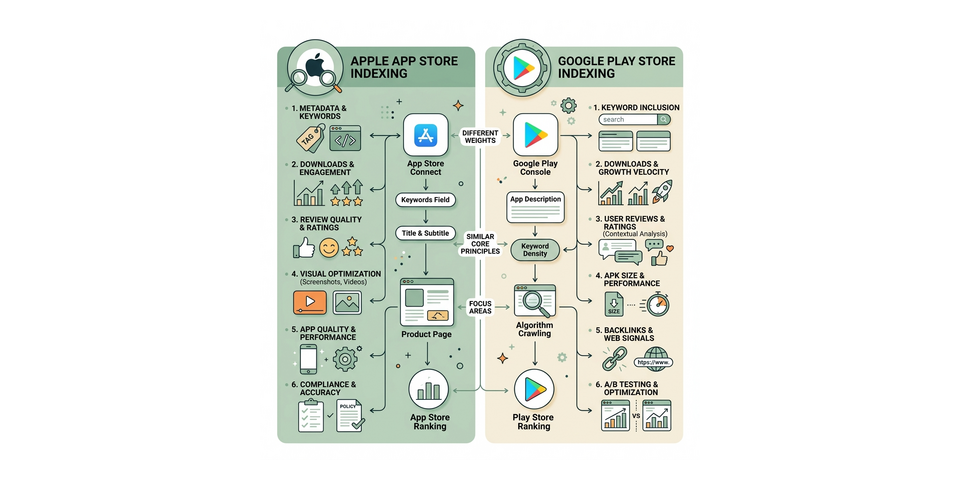
Google Play uses a semantic search model closer to web search. It crawls your app title, short description, and full description, then evaluates relevance using context, word proximity, and historical install behavior — not just exact keyword matches.
The three primary text surfaces
- App Title — 50 characters. Your semantic anchor.
- Short Description — 80 characters. Visible above the fold; strong conversion and indexing role.
- Full Description — 4,000 characters. Supports long-tail indexing when written naturally.
Write for humans first, algorithms second
Google’s listing guidelines explicitly discourage repetitive or misleading metadata. Keyword-dense titles that read like tag lists (Best Free Calorie Diet Weight Loss Tracker App) tend to underperform against clear, benefit-led copy — even when the stuffed version contains more search terms.
Practical pattern for Google Play:
- Title:
FitPulse: Calorie & Macro Tracker(brand + core category) - Short description:
Meal log, barcode scan, and weight goals for daily nutrition tracking.(benefit + supporting terms in natural language)
The iOS Keyword Field: Tactics Most Teams Skip
The keyword field is easy to overlook because users never see it. That invisibility makes it one of the highest-ROI optimization surfaces on iOS.
Formatting rules that actually matter
- Use commas without spaces between terms:
budget,expense,financenotbudget, expense, finance(spaces waste characters). - Do not repeat words already in your title or subtitle.
- Do not include your app name or competitor names (Apple policy risk).
- Singular often covers plural in Apple’s system — test with your ASO tool rather than doubling
tracker,trackers. - Avoid special characters and category names that add no search value.
A 100-character keyword field example
For a budgeting app with title Aura: Budgeting and subtitle Expense Tracker:
planner,savings,finance,bill,split,receipt,monthlyThat adds seven unique indexing roots without duplicating budgeting, expense, or tracker from visible fields.
Localization note
Each App Store locale has its own keyword field. A direct English-to-German translation of keywords rarely works. Run locale-specific keyword research — the same principle applies to subtitle copy in Play Store localization workflows.
Promotional Text vs Subtitle on Apple
Teams frequently confuse subtitle and promotional text. They are not interchangeable.
| Field | Limit | Indexed for search? | Best use |
|---|---|---|---|
| Subtitle | 30 chars | Yes | Core value prop + secondary keywords |
| Promotional Text | 170 chars | No | Seasonal offers, feature launches, timely updates |
Promotional text can be changed without a full app submission on Apple — making it ideal for launch week messaging. It will not help you rank for "habit tracker". Put searchable terms in the subtitle and keyword field instead.
Google Play Long Description and Metadata Synergy
On Google Play, the full description still matters — but not the way teams used in 2015.
Modern best practice:
- Front-load the first 250 to 350 characters with natural sentences that reinforce title and short-description terms.
- Use short paragraphs and bullet lists for readability (humans and crawlers both benefit).
- Avoid repeating the exact same keyword ten times; vary phrasing (
meal log,food diary,nutrition tracking). - Align feature names with screenshot captions for consistent semantic signals.
Your short description does the heavy lifting for both conversion and indexing. The long description expands coverage for long-tail queries and supports AI and hybrid search discovery outside the store.
What the Data Actually Says About Metadata Impact
ASO metadata research is fragmented — Apple and Google do not publish controlled experiments on title rewrites. The table below summarizes directional benchmarks from industry sources. Treat percentages as ranges observed across practitioner case studies, not guaranteed outcomes for your app.
| Signal | What practitioners consistently observe | Source / context |
|---|---|---|
| Search as acquisition channel | ~65% of iOS discoveries originate from search | Apple Search Ads |
| Listing engagement window | ~7 seconds average time on page before install/exit decision | StoreMaven |
| Screenshot-led conversion lift | Up to ~33% download lift when first screenshot is optimized | StoreMaven |
| Tap-through to install (category avg.) | ~33.4% iOS / ~27.7% Google Play | AppTweak category benchmarks |
| Title keyword alignment | Meaningful rank movement often visible within 2 to 4 weeks after a disciplined rewrite | ASO practitioner consensus; measure per app |
| Zero-repetition metadata | Typically frees 3 to 8 additional indexing roots on iOS by reclaiming duplicate words | Derived from combinatorial indexing mechanics |
What we deliberately avoid claiming: fabricated precision like +22.4% rank position without a linked study, or anonymous case studies presented as measured experiments. If you cannot cite the method, do not cite the number — a standard we apply across Nakxi benchmark research as well.
The Conversion Loop: Rankings and Installs Feed Each Other
Ranking and conversion are not separate funnels. They form a feedback loop.
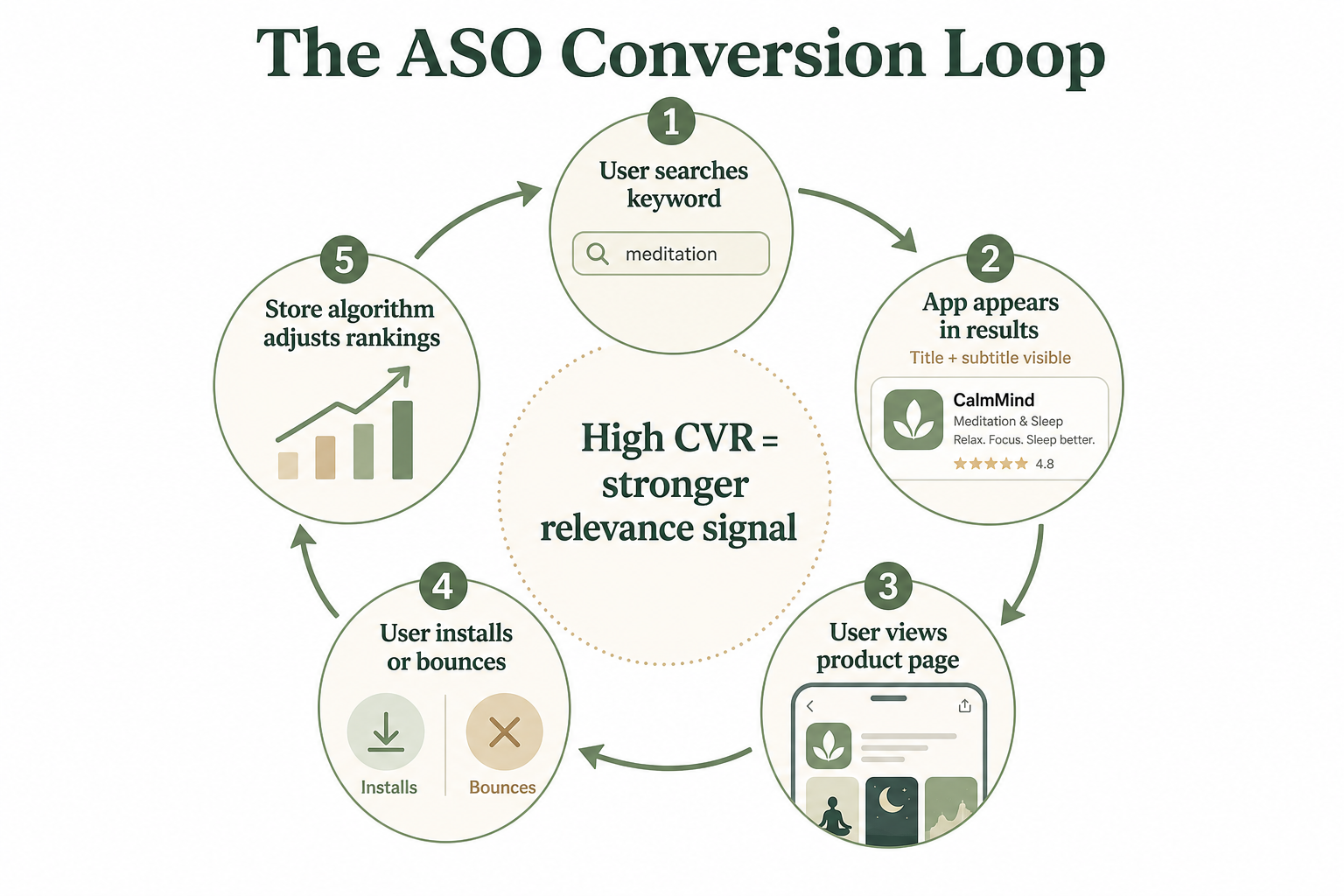
Here is how the loop works in practice:
- A user searches a term you index for.
- Your title and subtitle appear in results — they must match intent instantly.
- The user opens your product page. Only ~2% read the long description on Apple; screenshots carry most conversion weight.
- The user installs or bounces.
- The store updates its relevance model. Strong conversion for a keyword cluster supports visibility; weak conversion can suppress it.
This is why a #3 rank with poor conversion often loses to a #8 rank` with excellent conversion over time. Metadata gets the right user to the door. Visuals and social proof close the install.
10-Step ASO Metadata Optimization Framework
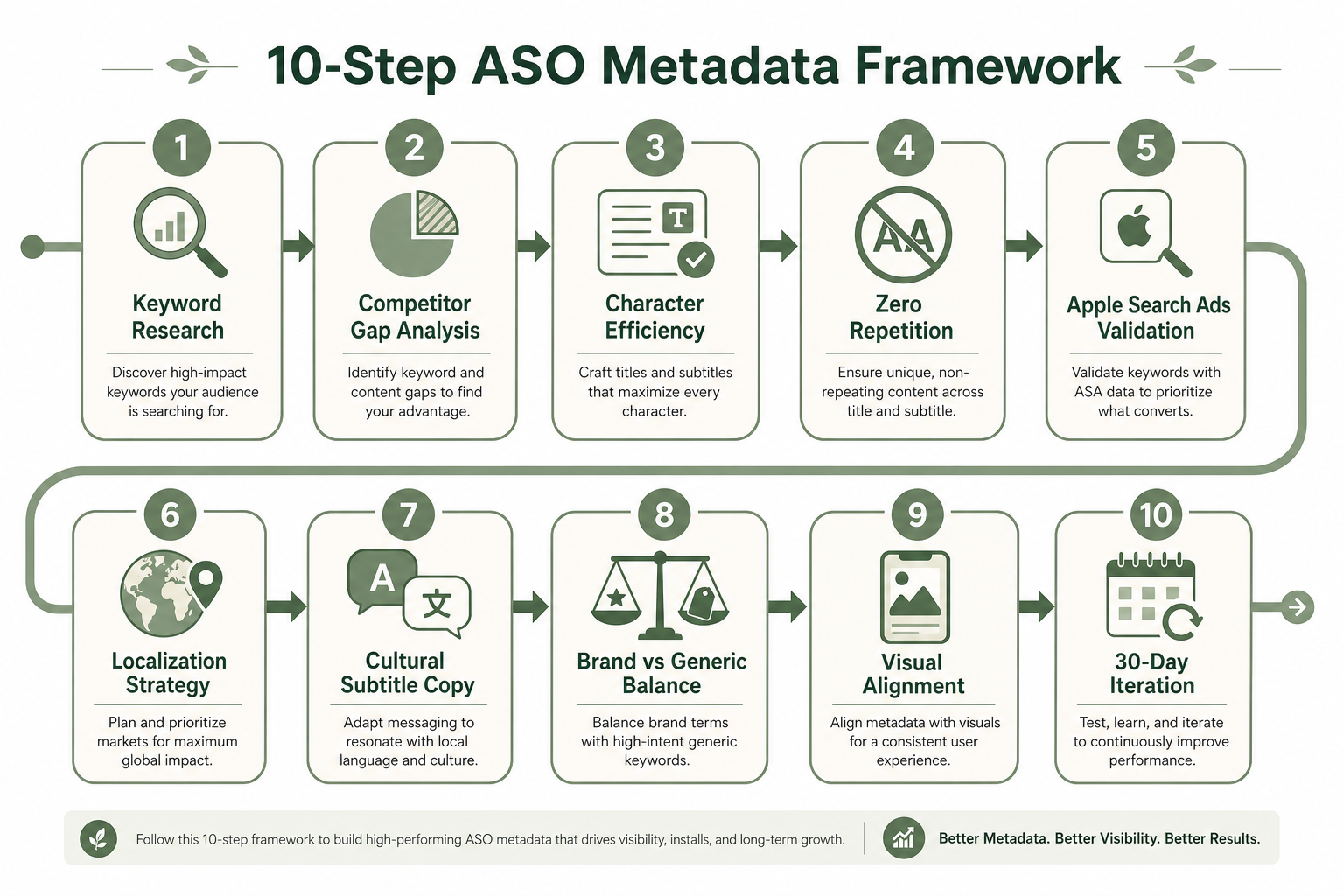
Step 1: High-intent keyword harvesting
Use ASO tools (AppTweak, MobileAction, AppRadar, or similar) to build a keyword set scored by relevance, difficulty, and business intent — not volume alone. Ranking #3 for a 2,000-search-term keyword beats #40 for a 50,000-search-term keyword you cannot plausibly win.
Step 2: Competitor semantic gap analysis
Export title and subtitle patterns from the top five to ten competitors in your subcategory. Map which high-intent roots they own (pomodoro, macro, offline, widget) and identify gaps you can claim without duplicating their exact phrasing.
Step 3: Mathematical character efficiency (iOS especially)
With 30-character caps, audit every letter.
- Inefficient:
Mindful: Meditation & Mind(29 chars — repeatsMind) - Efficient:
Mindful: Meditate, Sleep, Focus(30 chars — three unique roots)
Step 4: Enforce zero repetition across fields
If your title contains Budgeting, do not repeat budget, budgeting, or budgets in subtitle or keyword field. Each repetition burns space without adding indexing power on Apple.
Step 5: Validate with Apple Search Ads (iOS)
Before moving a speculative keyword into your title, test it with Apple Search Ads. Watch tap-through rate and install rate at the keyword level. Low install rate despite high taps usually means intent mismatch — demote that term from title consideration.
There is no universal CVR threshold published by Apple. Use your category baseline from AppTweak or your own historical Search Ads data as the benchmark.
Step 6: Build a localization strategy, not a translation checklist
Each locale needs its own keyword research. German users may search ausgaben tracker while US users search expense tracker — direct translation misses both. Localize title, subtitle, keyword field (iOS), and screenshot captions together.
Step 7: Write subtitles for culture, not just language
Subtitles are your secondary pitch. US audiences often respond to outcome language (Save More Every Month). Some markets respond better to trust and security framing (Secure Money Organizer). Test tone per locale.
Step 8: Balance brand name vs generic discoverability
Household brands (Spotify, Notion) can lead with brand. Most indie apps cannot.
- Weak for search:
Lumina(6 chars, no category signal) - Stronger:
Lumina: Habit Tracker & Planner(clear category roots)
Keep brand prefix short — usually under 12 characters — to preserve room for keywords.
Step 9: Align metadata with visual assets
If your subtitle promises Offline Mode, screenshot 1 or 2 must show it. Apple increasingly uses OCR on screenshot text as a discovery signal (covered in our 2026 ASO guide). Mismatched text creates cognitive dissonance and hurts conversion.
Step 10: Run a 30-day iteration cycle
Search trends shift. Review ranks, conversion, and competitor moves every 30 to 45 days. Change one major element at a time (title OR subtitle OR keyword field) so you can attribute movement.
Worked Examples: Metadata Teardowns (Illustrative)
The examples below are illustrative teardowns showing metadata mechanics — not measured performance claims. Use them as templates for your own audit worksheet.
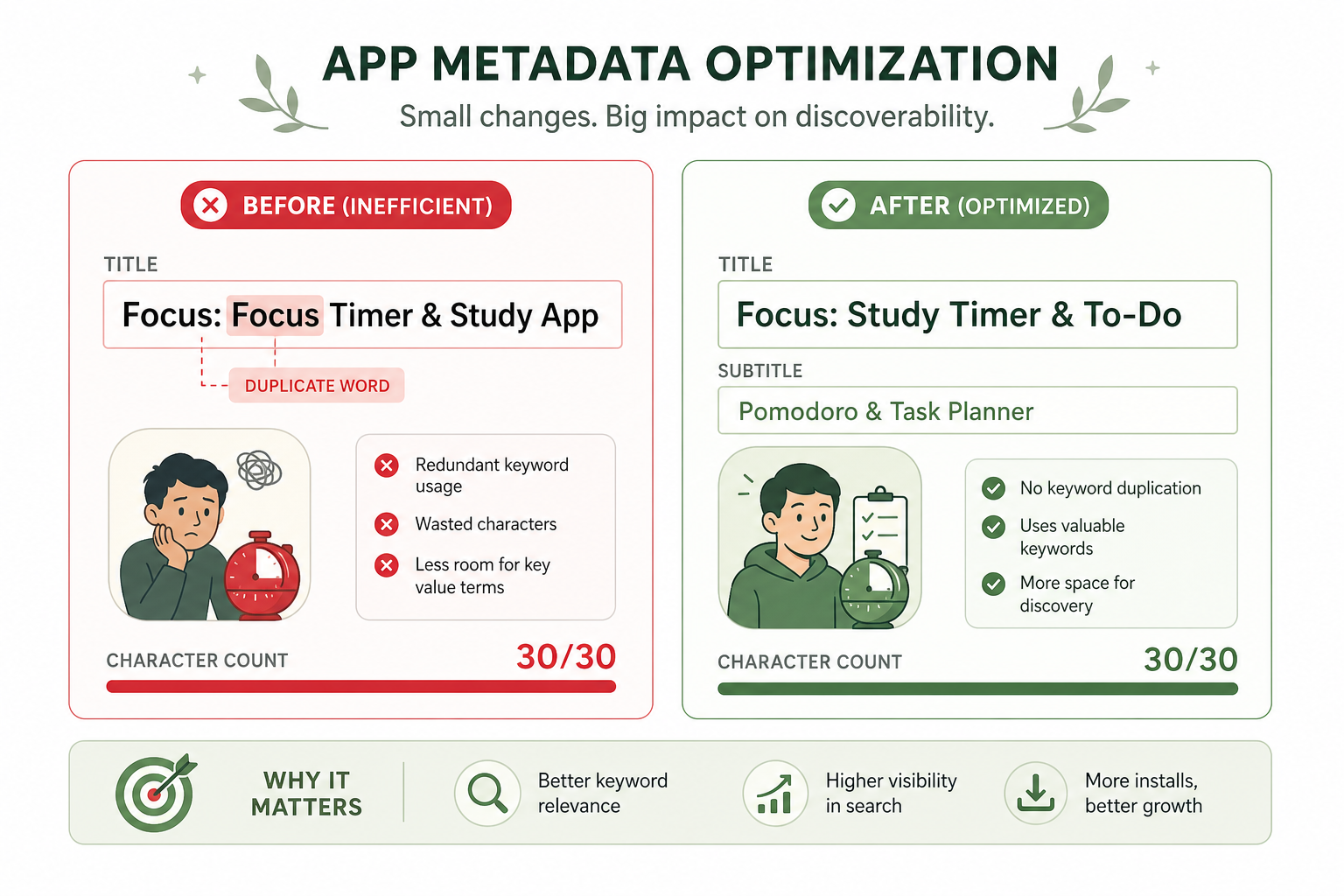
Teardown A: Productivity / focus timer category
Before (inefficient distribution):
| Field | Copy | Issue |
|---|---|---|
| Title | Focus: Focus Timer & Study App |
Repeats Focus and wastes App |
| Subtitle | Pomodoro for Students |
Ignores to-do, tasks roots |
| Keywords | focus,timer,study,app,pomodoro |
Duplicates title/subtitle words |
After (combinatorial efficiency):
| Field | Copy | Gain |
|---|---|---|
| Title | Focus: Study Timer & To-Do |
Adds to-do root; removes duplicates |
| Subtitle | Pomodoro & Task Planner |
Adds task, planner without repeating title words |
| Keywords | pomodoro,exam,schedule,reminder,widget |
Five new indexing roots, zero overlap |
Expected indexing combinations (examples): study planner, task timer, pomodoro reminder, exam schedule.
Teardown B: Fitness / nutrition category
Before:
| Field | Copy |
|---|---|
| Title | FitForm: Calorie Counter |
| Subtitle | Track Food, Diet and Weight |
| Keywords | calorie,food,diet,weight,track |
Problem: calorie, food, diet, weight, and track all repeat across fields — leaving little room for terms like macro, barcode, or meal.
After:
| Field | Copy |
|---|---|
| Title | FitForm: Calorie & Macro Tracker |
| Subtitle | Meal Log, Barcode & Weight |
| Keywords | nutrition,recipe,fasting,protein,gym |
Why this is stronger: Each field introduces unique roots. Google Play teams would expand the same strategy into the 80-character short description and first paragraph of the long description.
Teardown C: What strong published listings tend to share
Across categories, high-performing listings in ScreenVault and public store charts commonly show:
- Brand prefix + category descriptor in the title
- Outcome-led subtitle (not feature soup)
- No metadata duplication on iOS
- Screenshot headline echoing the subtitle’s primary promise
Common Metadata Mistakes That Waste Characters
1. Repeating keywords across all fields
The most common iOS mistake. Teams assume repetition increases weight. On Apple, it usually just reduces the number of unique roots you can index.
2. Using “App” as a keyword
App is almost never a useful search term (finance app is searched; app alone is not). It consumes 3 to 4 characters on iOS — expensive waste.
3. Changing title and subtitle simultaneously
You will not know which change moved ranks. Sequence changes and hold measurement windows.
4. Translating keywords instead of researching them
Literal translation misses local search behavior. Always research per locale.
5. Ignoring subtitle conversion for the sake of keywords
A subtitle stuffed with comma-separated terms converts poorly in search results. Write for humans; distribute roots intelligently.
6. Treating Google Play long description like a keyword dump
Repetitive descriptions hurt readability and may trigger quality filtering. Use natural variation.
7. Forgetting metadata when rebranding
A rebrand that shortens the title to brand-only (Lumina instead of Lumina: Habit Tracker) often drops category rankings until metadata is rebuilt.
How to Measure Metadata Changes Without Guessing
Metadata optimization without measurement is opinion writing. Use this minimum measurement stack:
| Metric | Tool / source | What it tells you |
|---|---|---|
| Keyword rank tracking | AppTweak, MobileAction, AppRadar | Did indexing change after rewrite? |
| Product page CVR | App Store Connect / Play Console | Are more viewers installing? |
| Organic install share | Store analytics | Is search growing vs paid/social? |
| Keyword intent validation | Apple Search Ads | Does this term convert when you pay for it? |
| Listing experiments | Google Play Store Listing Experiments | Which short-description variant wins? |
Suggested experiment protocol
- Baseline: Capture 14 days of ranks + CVR before changes.
- Change one field group (e.g., subtitle + keywords, but not title).
- Hold: Wait at least 14 days — 30 for title changes.
- Compare: Rank movement + CVR delta + qualitative search term coverage.
- Document: Record before/after copy so you can roll back losers quickly.
This mirrors the reproducibility standard in Nakxi’s screenshot benchmark methodology: if you cannot document what changed, you cannot claim what worked.
Align Metadata With Screenshots and Visual ASO
Metadata earns the tap. Screenshots earn the install.
In 2026, screenshot text increasingly influences discovery — Apple’s OCR indexing means captions are not decorative (detailed in our ASO trends coverage). A coherent listing stacks text and visuals like this:
| Layer | Example |
|---|---|
| Title | SleepWave: Sleep Tracker & Sounds |
| Subtitle | Cycles, Snore Log & Smart Alarm |
| Screenshot 1 headline | Track Every Sleep Cycle |
| Screenshot 2 headline | Snore Detection While You Rest |
When you localize metadata, localize screenshots in the same pass. Nakxi helps teams produce aligned, store-sized screenshot sets — including App Store and Play Store dimensions — so visual copy does not drift from your title and subtitle strategy. See the 2026 screenshot size guide for export specs.
For conversion-focused layout and messaging principles, pair this guide with how to create App Store screenshots that actually convert and 12 screenshot mistakes that hurt installs.
Frequently Asked Questions
Why does the app title have the highest weight in ASO?
On Apple, the app name is the most prominent indexed field practitioners optimize first. Google Play treats the app title as the semantic anchor for the listing. Exact weighting is not publicly documented by either store.
How long should an app title and subtitle be in 2026?
Apple: 30 characters each for app name and subtitle, plus 100 characters in the hidden keyword field. Google Play: 50-character title and 80-character short description.
What is the Conversion Loop in ASO?
Strong conversion reinforces relevance signals; weak conversion can suppress visibility for mismatched keywords over time.
Can I repeat keywords in my title, subtitle, and keyword field?
Avoid repetition on iOS — it wastes characters. Distribute unique roots across fields instead.
Does Apple Promotional Text affect keyword rankings?
No. Only the app name, subtitle, and keyword field are indexed for App Store search.
How often should I change my app title or subtitle?
Avoid rapid-fire changes. Test one major update at a time and measure for at least 14 to 30 days.
Should I use emojis in my app title or subtitle?
Generally no — they consume limited character space and add little indexing value.
How do I measure whether a metadata change worked?
Track keyword ranks, product page CVR, organic install share, and validate iOS keywords with Apple Search Ads where possible.
Conclusion
App title and subtitle optimization is not a copywriting exercise — it is indexing architecture on Apple and semantic positioning on Google Play. The teams that win organic search in 2026 treat metadata as a system:
- Distribute unique keyword roots across Apple fields using combinatorial logic.
- Write Google Play copy that reads naturally while reinforcing title terms.
- Measure every change with ranks, conversion, and install share — not gut feel.
- Keep visuals aligned so metadata promises match screenshot proof.
Start with the character limits cheat sheet, run the 10-step framework, and pair your next metadata iteration with a screenshot refresh in Nakxi. Search is still the largest discovery channel on mobile — your title and subtitle are how you claim your share of it.
Further reading on Nakxi: