
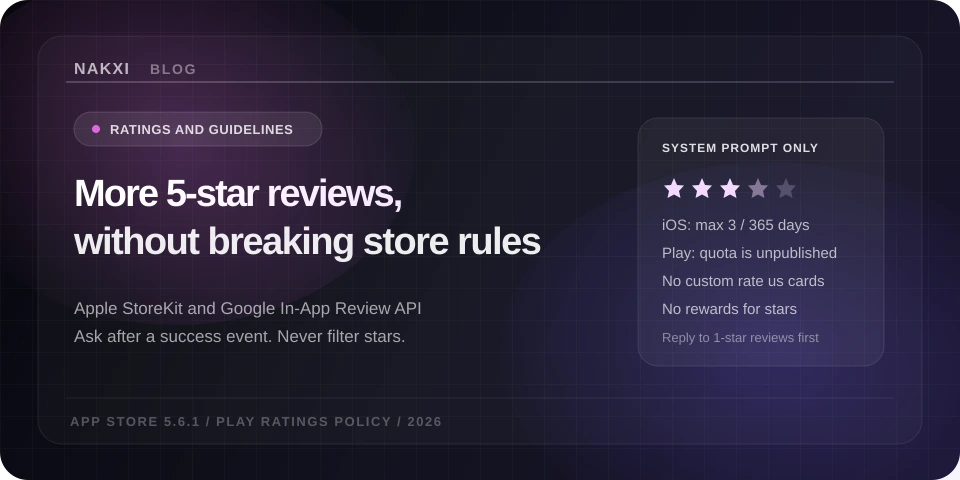
How to Get More 5-Star App Reviews Without Violating App Store & Google Play Guidelines (2026)
By Sagar Joshi
Published · Last updated
A higher star rating is not a growth hack you buy. Apple states, in App Store search, that search results use text relevance (title, subtitle, keywords, primary category) and user behavior, and that user behavior includes downloads, ratings and reviews, and more. The same page says ratings and reviews appear on the product page and in search results, and that they can influence how your app ranks. Google treats ratings as a quality signal users see on the listing; Play’s public ratings explanation says the star average for apps is weighted toward current quality, not a lifetime average, unless the app has very few ratings.
That is the whole conversion story, without invented percentages: the stars sit next to your icon in search, they sit on the product page before screenshots do their work, and both stores say they factor ratings into how they rank or present quality. The rest of this post is how to collect honest reviews under the written 2026 rules — Apple 5.6.1, 3.2.2(x), 5.6.3, plus Google Play’s User Ratings, Reviews, and Installs policy and the In-App Review API.
If you want the listing side of the same problem — generic titles, stale screenshots, lookalike metadata — that is the companion piece on Apple’s 2026 guideline changes. This one is only ratings, prompts, replies, and what to do with the text users already wrote.
Why the stars move ranking and conversion (what the stores actually say)
Apple does not publish a ranking formula. What it does publish is enough to plan around:
- Search ranking inputs. App Store search: results are based on text relevance and user behavior (downloads, ratings and reviews, and more).
- Where the rating shows. Same page: your rating appears in search results with the name, subtitle, and up to three screenshots or previews. Creating your product page repeats that ratings influence search ranking and that the summary rating is per territory.
- What a rating is. Ratings, reviews, and responses: users rate 1–5 stars; those ratings feed the summary you show. You can reset the summary when you ship a new version. Written reviews stay. Apple’s own warning: reset sparingly, because few ratings can discourage downloads.
- Review summaries. Apple now shows an LLM review summary on the product page (United States plus additional English storefronts listed on that page). The summary is compiled from individual reviews and refreshes over time. A pile of 1-star “crashes on launch” reviews is not only a number — it can become the paragraph at the top of Reviews.
Google’s documented mechanics are different and equally specific:
- The listing average is recency-weighted. Play’s comment posting policy and Play Console Help both say the rating users see is based on more recent ratings (current quality), with lifetime count shown separately. Shipping a crash-fix can move the public average without a “reset rating” switch. Apple has the reset; Play does not start ratings over on a new version.
- Console vs storefront. Play Console’s “Total ratings” metric is only available after five or more ratings. That is a Console reporting threshold, not a documented guarantee of when the storefront shows stars in every country. Do not plan a launch around an unofficial “5 reviews per country” folklore number; watch the live listing per market instead.
- ~24 hour hold. New ratings and reviews are generally held about 24 hours before they go public, so Play can look for abuse. You can still reply during the hold. If Play pauses an app’s ratings, Console shows it.
- Users can change their mind. One rating per user, editable any time. Play Console’s Updated ratings report even splits users who changed their rating after a developer reply vs without one. That is Google telling you replies are a real recovery path — not a claim that every reply raises a star.
None of that says “ask more often.” Both stores cap how often the system sheet can appear. Volume comes from (1) more people reaching a moment where the system is allowed to ask, (2) support that intercepts frustration before the store, and (3) replies that get people to edit a review after you actually fixed the thing they named.
Apple vs Google: what the APIs allow (and what gets you flagged)
Apple — StoreKit requestReview, not your own stars
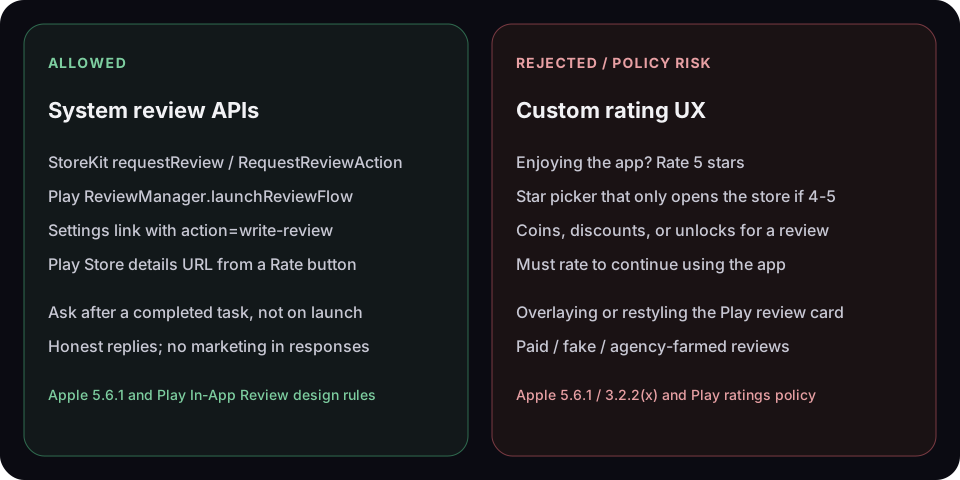
Guideline 5.6.1 is unambiguous: use the provided API to prompt for a review; Apple will disallow custom review prompts. Keep public replies targeted; no personal information, spam, or marketing.
The current APIs:
- SwiftUI:
RequestReviewAction(requestReviewenvironment value). - UIKit / AppKit:
AppStore.requestReview(in:). - Older code:
SKStoreReviewController. Apple’s ratings marketing page still names it. StoreKit docs point toRequestReviewAction. Treat the system sheet as the requirement; do not keep a custom star dialog “until you migrate.”
StoreKit’s documented display rules (shipping app, not TestFlight):
| Situation | What StoreKit may do |
|---|---|
| Person has not rated/reviewed on this device | Show the request at most three times in a 365-day period |
| Person has rated/reviewed on this device | May show again only if the app version is new and more than 365 days since the previous review |
| TestFlight | The call has no effect |
| Development | The sheet usually always shows, so QA is not a production proof |
| You call it | No guarantee the sheet appears. Do not treat “API returned” as “user saw stars.” |
Human Interface Guidelines — Ratings and reviews: ask only after people have used the app; not on first launch or during onboarding; do not interrupt a task; prefer the system prompt. People can opt out of these prompts for all apps.
StoreKit documentation also says: because the API may not present an alert, do not call it in response to a button tap. A Settings row that says “Write a review” should open the App Store URL with action=write-review, which Apple explicitly allows as a persistent link on settings/configuration screens.
Guideline 3.2.2(x): you must not force users to rate, review, download other apps, or take other store actions to use the app. You may incentivize in-app actions (finish a level, watch an ad). Stars are not an in-app currency.
Guideline 5.6.3 and the Business section: manipulating charts, search, reviews, or referrals is discovery fraud. Apple separately says that paid, incentivized, filtered, or fake feedback — including third-party services that do it for you — can get you removed from the Developer Program. “Filtered” is the 4/5-star gate in a custom UI.
Guideline 5.6.4: excessive negative reviews and refunds can be treated as an app-quality Code of Conduct issue, not only an ASO problem. Prompting harder does not fix that.
Apple also tells you to put support contact in the app and on the product page so people can reach you instead of dumping a 1-star review. That is official, not a growth-blog trick.
Google Play — In-App Review API, unmodified card
The Play In-App Reviews API (ReviewManager.requestReviewFlow → launchReviewFlow) is the allowed in-app path. Devices: Android 5.0+ with Play Store, or ChromeOS with Play Store. Play Core 1.8.0+.
Google’s when to request rules:
- After the user has experienced enough of the app to give useful feedback.
- Do not prompt excessively (quota + frustration).
- Do not ask questions before or while showing the rating UI — including “Do you like the app?” and “Would you rate this 5 stars?”
Design rules: show the Play card as-is. No resizing, opacity tricks, overlays, or programmatic dismiss. Play removes it after the user acts or after its own timeout.
Quota: time-bound, unpublished, can change without notice. Google’s example: calling launchReviewFlow more than once in a short period (e.g. less than a month) might not show a dialog. Completion of launchReviewFlow does not tell you whether the dialog appeared or whether a review was submitted. Continue the app flow either way; do not tell the user an error occurred.
Because of that, Google says do not attach the API to a call-to-action button. If you want a Rate button, open the Play Store listing.
User Ratings, Reviews, and Installs: no fake ratings, no incentivized ratings (discounts, rewards, “rate 5 stars for coins”), no forced/deceptive pop-ups, no review text that is coupons/affiliate spam. When you reply, keep it on the user’s issues and do not ask for a higher rating.
Play listing copy also cannot use unattributed testimonials or “#1 rated” claims — see store listing best practices. That is metadata, but it is the same honesty bar as reviews.
Side-by-side: do this / do not do this
| Practice | App Store | Google Play |
|---|---|---|
| System in-app prompt | Required (requestReview / RequestReviewAction) |
Required for in-app (Play In-App Review card, unmodified) |
| Custom star UI / “enjoying the app?” gate | Disallowed (5.6.1); filtered feedback is manipulation | Disallowed (pre-questions + ratings policy) |
| Prompt on every cold start | Against HIG; burns the 3/365 quota | Against “don’t prompt excessively”; hits unpublished quota |
| Rate button | Store URL + action=write-review in Settings |
Play Store details URL — not launchReviewFlow |
| Pay or gift for a review | Program-level risk (incentivized / fake) | Explicit policy violation |
| Must rate to unlock the app | 3.2.2(x) | Forced prompt / manipulation |
| Ask for a higher rating in a public reply | 5.6.1: no marketing; stay on-topic | Play: do not ask for a higher rating |
| Test the sheet | Dev builds show it; TestFlight does not | Internal testing / internal app sharing; FakeReviewManager does not show UI |
The “ask at the right moment” framework
Apple’s ratings page: ask when users are most likely to feel satisfaction — completed an action, level, or task — and do not interrupt the activity. Google: after they have used the app enough; example in the Kotlin guide is completing a level. HIG: not first launch, not mid-task.
A practical trigger is a success event you already log, plus your own cooldown, because the stores will not tell you the sheet showed.
Good triggers (examples of completed work, not open-app):
- A document exported, a workout saved, a file sent, a level completed, an order delivered, a streak day the user chose to celebrate.
- First successful sync after onboarding — not the splash, not the permission screen.
- After a support ticket is marked resolved in your product, if that is a real completion (still use the system API, not a custom card).
Bad triggers:
applicationDidBecomeActive/ first session.- Paywall close, ad finish, or permission denial.
- Immediately after a crash recovery or error toast.
- Every session until StoreKit/Play silently no-ops and you never know why volume is flat.
Your logic (the stores will not do this for you):
- Require a minimum of meaningful events (you define them). First-launch “success” is still onboarding.
- Local cooldown stricter than Apple’s 3/365 or Play’s “maybe once a month” example — e.g. at most once per shipped version, or 30+ days between attempts.
- Never retry in a loop because the sheet did not appear.
- Keep a Settings “Write a review” link that opens the store. That path is always honest.
- Put support where angry users look (in-app help, product page support URL) before you spend a StoreKit slot.
This is also where What is ASO meets ratings: screenshots convert the visit; the star is already in the search row. Asking at a success event raises the chance the behavior signal Apple named is a satisfied user, not a trapped one.
How to respond to negative reviews (and what you may not say)
Apple: Admin or Customer Support roles can reply in App Store Connect. The reviewer is notified and may update the review. Only the latest response shows. Prioritize lowest stars and current-version bugs if you cannot answer everything. After a fix, say so in What’s New and in the reply. Billing or download failures: send them to Apple Support, not a shrug. Offensive/spam reviews: Report a Concern, do not argue in public. The reviewer is not notified of the report.
You may use the star rating in marketing if it is the current rating. You may quote a written review only with that reviewer’s permission.
Google: one public reply per review, editable. User gets push and email. Email includes your listing contact address. Suggested replies exist in Console; still edit them. Developer comment policy: clear and relevant, not abusive, no solicitations or promotions, no profanity. Beta/internal testing feedback is private to you.
Templates below stay inside those constraints: acknowledge the issue, say what you did or will do, offer a support path, do not ask for stars.
Crash / “unusable after update”
Thanks for flagging this — a crash after [version] is on us. We shipped a fix in [version]. If it still fails, email [support@] with the device and OS so we can reproduce it. Sorry for the breakage.
Feature missing / “doesn’t do X”
You are right that [X] is not in the app today. We do [Y] instead. If X is the job you hired us for, write [support@] — we read those against the roadmap. Sorry the listing didn’t make the limit obvious.
(If the listing overclaimed, fix the listing. That is accurate metadata and Apple 2.3, not a reply problem.)
Pricing / subscription
Thanks for the note on pricing. [Plan] is [price] / [period], cancel in [Store settings path]. If you were charged in error, [Apple: Apple Support / Play: Play subscriptions help]. We will not argue the price in this thread; the terms should have been clear before purchase.
Billing / download (Apple)
Sorry you hit a download or billing error — that is handled by Apple, not by us in-app. Use reportaproblem.apple.com or Apple Support with the order. If they say it is the app binary, email [support@] and we will take it.
Abusive review
Do not reply. Report. If you must leave a record in your internal tracker, keep PII out of the public box (5.6.1).
After you actually shipped the fix
We shipped [version] on [date] to fix [the thing you named]. If you still see it, email [support@]. If the update resolved it, you can edit this review from the store page — only if you want to; no pressure.
The last sentence is optional. Google’s policy is “don’t ask for a higher rating.” “You can edit if the update resolved it” is factual. “Please go leave 5 stars” is not.
Set App Store Connect / Play email alerts for new and updated reviews after a major release. Apple says that window is when people are most willing to talk.
Turn review text into listing and screenshot work
A prompt increases count. Themes in the text tell you why the average is stuck.
Apple’s product-page review summary and Play’s listing review summaries (English, when there is enough volume) are what shoppers may read in one paragraph. If that paragraph is “sync fails” and screenshot 1 says “Never lose a file,” you are paying for contradiction. Guideline 2.3 already requires screenshots and description to match the app; reviews are the users enforcing it.
Practical loop:
- Pull themes from 1–3★ reviews (crashes, pricing, onboarding, a feature the screenshots advertise).
- If the complaint is a bug, ship the binary, then What’s New + replies. Do not “ASO” a crash.
- If the complaint is expectation (“I thought it was offline / free / on Apple Watch”), fix title, subtitle, description and the first three screenshots. Play also bars “#1” and unattributed quotes in the description.
- If the same theme is praise in 5★ reviews, that phrase belongs on a screenshot caption if it is true.
You can do this by exporting Console/App Store Connect CSVs. Faster: paste the public listing into Nakxi’s Review Analyzer. The lite report uses recent public App Store or Play reviews, focuses on low-star themes, and returns sample quotes plus a plain-language fix cue — no account required for the lite pass. Full runs (project-linked, refresh on Growth) sit next to screenshot and metadata tools so the same theme can become a caption change instead of a slide deck.
For a whole-listing score (not only reviews), Analyze My App and the metadata audit read the live URL. None of these replace Play Console’s own review-analysis topics (stability, speed, and so on) or App Store Connect; they shorten the path from “users said X” to “listing still claims Y.”
Review-request calendar and checklist
Copy this into your release wiki. It is not a downloadable PDF; it is the operating cadence the APIs actually support.
Before you ship a version
- Success-event trigger is wired to StoreKit
requestReview/ PlaylaunchReviewFlow— not to a custom star view. - Local cooldown: at most one attempt per version (or ≥30 days), regardless of whether a sheet appeared.
- No “Do you love us?” pre-prompt. No 4–5★ filter.
- Settings (or account) screen has a Write a review control that opens the store URL (
action=write-reviewon Apple; package details URL on Play). - Support URL / email is on the product page and findable in-app (Apple’s stated alternative to a bad review).
- Subscription price, period, and cancel path are honest in-app (Apple 3.1.2) so pricing reviews are not “the listing lied.”
- QA: iOS TestFlight will not show the sheet; use a development build. Android: internal test track or internal app sharing;
FakeReviewManagerdoes not prove UI.
Week of release
- What’s New names the bugs you actually fixed (Apple 2.3.1(a) already rejects hollow “bug fixes” notes).
- Alerts on for new/updated reviews (App Store Connect + Play).
- Queue replies for 1–2★ on the current version first.
- Do not reset the Apple summary rating unless the old average is dominated by a now-fixed issue and you can live with a thin rating in every territory. Play has no reset; recency weighting is the mechanism.
Ongoing (weekly is enough for most indie apps)
- Reply where you can fix or clarify; report abuse; never ask for a star bump.
- Cluster themes. If the same 1★ line repeats, it is a product or listing defect, not a prompt-timing problem.
- Run Review Analyzer after a meaningful review volume change; push themes into metadata/screenshots in the ASO workflow.
- Re-read Apple 5.6 and Play’s ratings policy before you add any “rate us” experiment. The APIs did not get looser in 2026; the custom-prompt era is closed.
What this will not do
It will not make StoreKit or Play show a sheet on demand. It will not hide 1-star reviews. It will not outrank a competitor because you asked three extra times. Apple already listed ratings as one behavior signal next to downloads; Google already weights recent quality. The honest way to more 5-star reviews is more people finishing real work in the app, a system prompt at that moment, support before rage-taps, and a listing that matches what the binary does.
Start with the themes already on your product page: Review Analyzer. Then fix the listing those reviews are arguing with.