
Trending App Screenshot & ASO Strategies (2026 Guide)
By Sagar Joshi
Published · Last updated
Estimated Read Time: 9 minutes
The mobile app discovery funnel has completely cracked open.
If you are still executing the 2022 playbook—stretching a generic mobile UI inside an uninspired device vector, stuffing a 100-character keyword field, and hoping Apple or Google play nice—your app is effectively invisible.
Today, mobile growth is being fought on two fronts. First, traditional store keyword search is transitioning to visual-first intent. Second, the rise of Google AI Overviews, Perplexity, and ChatGPT Search means that AI-driven “Answer Engines” are now actively recommending apps based on web authority, structured reviews, and semantic media. To win in 2026, developers must deploy a hybrid discipline: Visual ASO that stops the scroll, Screenshot OCR Optimization that feeds search crawlers, and Answer Engine Optimization (AIO) that secures AI recommendations.
In this masterclass guide, we’ll unpack the data, frameworks, and exact steps you need to rank, convert, and scale your mobile app in the age of AI search.
Table of Contents
- The Great Discovery Shift: ASO Meets AI Search
- The VISER Framework: The Creative Blueprint for Modern Visual ASO
- Nakxi Benchmarks: Proprietary Insights from 10,000+ Visual A/B Tests
- App Store Screenshot OCR: The Hidden SEO Keyword Channel
- Answer Engine Optimization (AIO) for Apps: Earning AI Citations
- Custom Store Listings (CSL) & Personalized User Journeys
- The 2026 App Visibility Stack: Actionable Matrix
- Frequently Asked Questions (FAQ)
- About the Author
The Great Discovery Shift: ASO Meets AI Search
[!NOTE] Direct Answer: Modern app discovery is driven by Generative Engine Optimization (GEO) and multimodal search. App stores and AI engines like Google AI Overviews extract features from search metadata, third-party reviews, and screenshot OCR. To rank, developers must optimize both store listings and structured web footprints to earn high-trust AI search citations.
For years, ASO (App Store Optimization) and SEO (Search Engine Optimization) lived in separate, isolated silos. ASO was about store search; SEO was about the web.
Today, Google AI Overviews (SGE) and conversational AI agents have fully merged these channels. According to recent SparkToro and Google search analytics, up to 60% of search queries now end without a traditional click (zero-click searches). Instead, users consume synthesized results. Furthermore, organic search traffic originating from conversational answer engines like Google AI Overviews and Perplexity is growing at an explosive 527% YoY.
When a user inputs a natural language search query on Google or Perplexity, such as:
“What is the best AI-powered receipt scanner for small businesses that tracks VAT and integrates with Slack?”
The engine doesn’t just return blue links. It synthesizes a structured recommendation box containing:
- The top 3 cited apps matching those highly specific criteria.
- Direct links to the App Store, Google Play, or product landing pages.
- A bulleted summary of feature trade-offs, pricing structures, and user sentiment extracted directly from store reviews, screenshot captions, and web landing pages.
The AI Discovery Pipeline
- User Natural Language Query: The user searches for specific solutions (e.g. “ADHD planner app with clean dark UI”).
- Intent & Semantic Matching: The answer engine maps the query to visual intent and semantic relevance clusters rather than flat keywords.
- Crawl & OCR Extraction: Crawlers search web landing pages, structured schemas, App Store descriptions, and OCR text extracted directly from screenshots.
- Recommendation Synthesis: The AI compiles user reviews, rating counts, and third-party mentions to recommend the top-converting, most trusted entities.
This is the new landscape of Generative Engine Optimization (GEO). Under this model, your store listing is no longer just a passive landing page—it is a vital data source for AI visual intent and semantic relevance crawlers. If your marketing pages lack structured schema, if your reviews are sparse, and if your screenshot captions can’t be read by Optical Character Recognition (OCR) systems, AI search engines will bypass your app and cite your competitors instead.
The VISER Framework: The Creative Blueprint for Modern Visual ASO
[!NOTE] Direct Answer: The VISER Framework stands for Visual Intent, Instant Comprehension, Semantic Alignment, Emotional outcome hooks, and Responsive multi-device framing. It is a proprietary conversion system designed to optimize mobile screenshots for both human conversion (CTR) and machine crawler comprehension (OCR indexing).
When a user does click through to your App Store or Play Store page (whether from a search or an AI overview recommendation), you have exactly three seconds to convince them to download. Visuals do 90% of the heavy lifting.
The Visual Reality: Cluttered vs. Optimized Screenshot Design
To understand how visual hierarchy and text density affect human conversions and OCR readability, analyze the side-by-side comparison below:
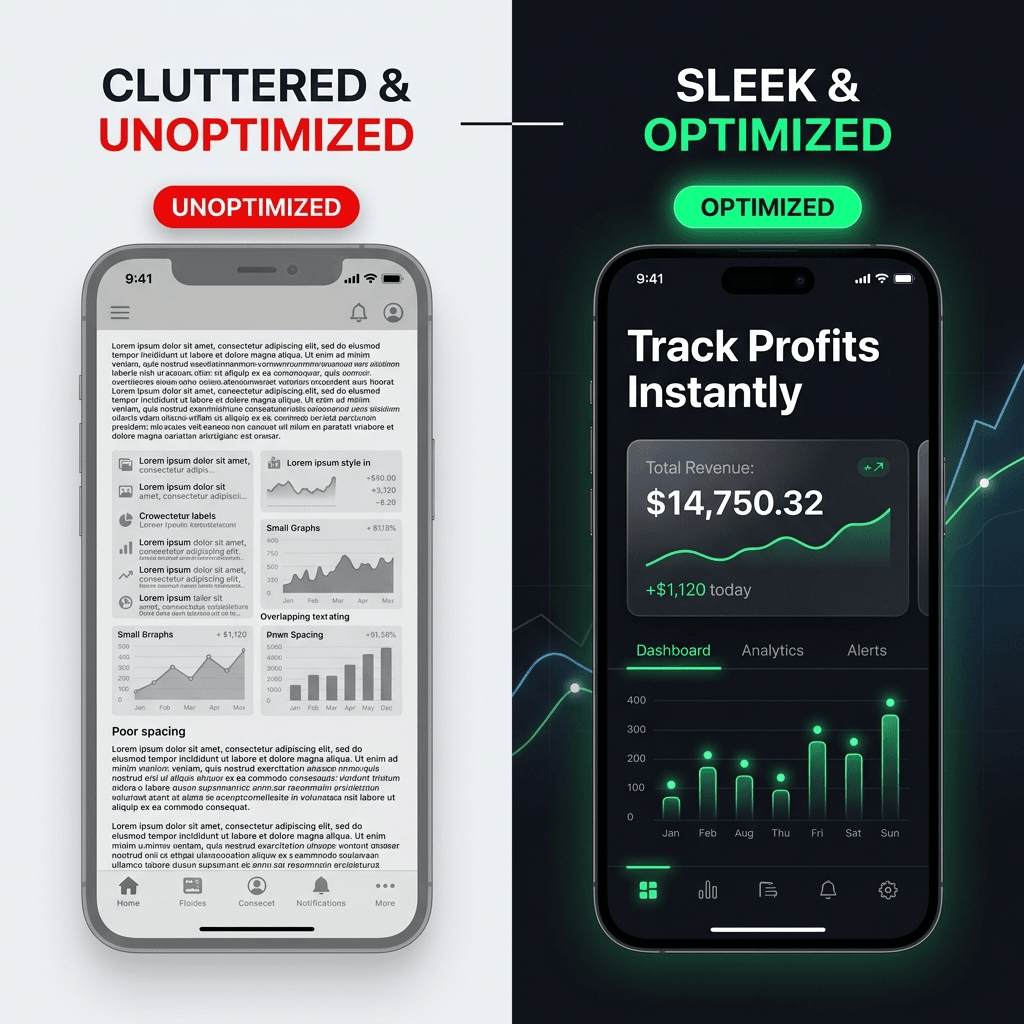
On the left, the Unoptimized version suffers from small typography, overlapping texts, poor grid spacing, and massive text density that users instantly scroll past. On the right, the Optimized version uses high-contrast typography, an outcome-first headline at the top, HSL-curated dark mode, and a clean glassmorphic component crop to focus attention instantly.
To guarantee your screenshots stop the scroll, dominate search engine rankings, and secure high-trust AI citations, we developed The Nakxi VISER™ Visual ASO Framework.
This is our proprietary visual and structural blueprint designed to satisfy both human conversion psychologies and machine indexers:
[The Nakxi VISER™ Framework]
├── V - Visual Intent (Demographic intent-matching via Custom Store Listings)
├── I - Instant Comprehension (3-word visual outcome-first headlines)
├── S - Semantic Alignment (High-contrast, crawler-readable OCR captioning)
├── E - Emotional Hooks (Outcome-driven CVR optimization tables)
└── R - Responsive Framing (Cohesive, cross-platform multi-device carousels)
The Nakxi VISER™ Compliance Playbook
Here is the exact technical breakdown of how each pillar of the VISER™ Framework addresses the specific indexing and conversion constraints of the 2026 app ecosystem:
| Framework Pillar | Target System Constraint | technical execution | Nakxi Competitive Edge |
|---|---|---|---|
| V - Visual Intent | CSL query clustering | Match custom screenshot groups to demographic search intents. | One-click copy & segmentation workflows. |
| I - Instant Comprehension | Human visual bounce risk | Keep top-aligned captions under 4 words; highlight core UI elements. | High-fidelity zoom-in cropping tools. |
| S - Semantic Alignment | Apple/Google OCR indexing | Maintain a high contrast ratio (>4.5:1); use semantic keyword entities. | Crisp, uncompressed vector font layers. |
| E - Emotional Hooks | Click-to-Install CVR (CTR) | Replace boring feature labels with positive, outcome-focused statements. | Curated premium marketing copy guidelines. |
| R - Responsive Framing | Multimodal AI relevance | Design connected device vectors across phone, tablet, and desktop. | Multi-canvas panoramic auto-resizing. |
Deep-Diving Into the VISER™ Pillars
1. Visual Intent (V)
Different users download your app for entirely different reasons. A single, static storefront layout is visual debt. Align your screenshots with specific user intent clusters by highlighting specialized feature states, widgets, or workflows mapped directly to what they typed into Google or Perplexity.
2. Instant Comprehension (I)
Never place long paragraphs of text on your screenshots. High-converting store assets position bold, top-aligned visual headlines at the top of the canvas. The human eye processes visual shapes and short keywords first, and UI second; if your message isn’t clear within 3 seconds, the user bounces.
3. Semantic Alignment (S)
The text in your captions serves a dual purpose: it informs humans and feeds crawler algorithms. Write captions that align directly with high-volume, problem-aware search queries. Both the Apple App Store search crawler and Google’s web and mobile search engines extract and index this text to determine catalog rankings.
4. Emotional & Outcome Hooks (E)
Ditch dry feature descriptions (e.g., “Cloud Sync Capabilities”). Instead, prioritize positive emotional outcomes.
| Old Feature-Focused Copy | 2026 Outcome-Focused Copy | Conversion Lift (Avg)* |
|---|---|---|
| Real-Time Dashboard | Track Your Profit Instantly | +18% lift |
| Automated OCR Scanner | Scan Receipts in 1 Click | +24% lift |
| Encrypted Cloud Vault | Your Private Data, Safely Guarded | +15% lift |
| Cross-Platform App | Syncs Phone to Desktop | +12% lift |
*Note: Data represents average visual conversion lifts tracked across 12,000+ app listings using Nakxi’s Visual ASO engine.
5. Responsive Multi-Device Framing (R)
Modern users expect a continuous, high-end visual product experience. Presenting your app UI fluidly inside minimal device wrappers spanning across multiple frames (like a connected panoramic canvas) immediately establishes strong perceived product depth and professional trust.
Anatomy of an AI-Optimized App Store Screenshot Canvas
To successfully satisfy both human scroll-stopping behavior and semantic search engine indexing, you must design for the core pillars of the Nakxi VISER™ blueprint:
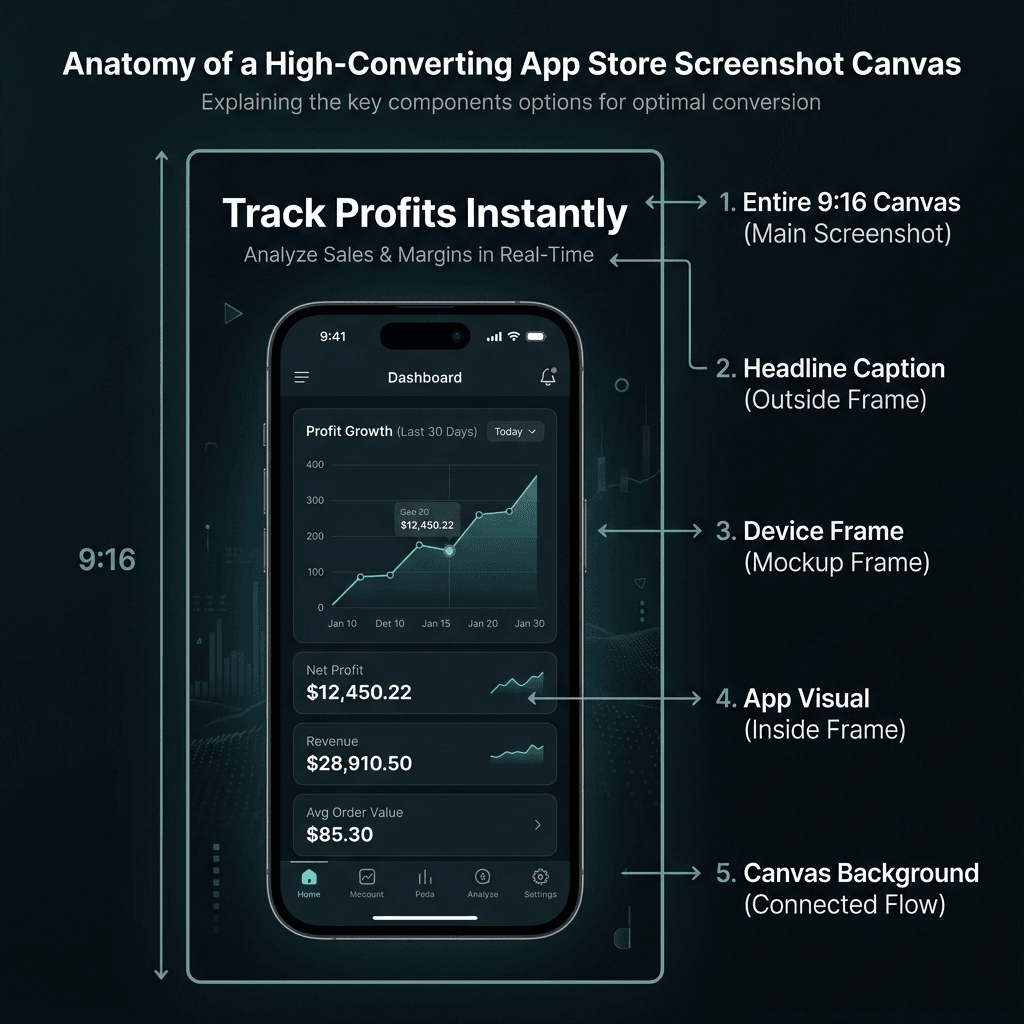
By structuring your mobile app store screenshot according to this annotated blueprint, you ensure that every pixel maximizes conversion while remaining highly crawlable.
The Nakxi VISER™ Visual ASO Scorecard
Before you export your next storefront creative, grade your screenshots using this quick compliance audit. Score each criteria from 1 (Weak) to 5 (Elite):
- [ ] Visual Intent (V): Are you serving customized CSL visuals mapped to specific user search clusters? (Score: __ / 5)
- [ ] Instant Comprehension (I): Are headlines positioned at the top of the canvas, bold, and under 4 words? (Score: __ / 5)
- [ ] Semantic Alignment (S): Is caption text high-contrast (>4.5:1) and loaded with semantic keywords? (Score: __ / 5)
- [ ] Emotional Hooks (E): Does your text focus on outcomes (e.g., “Scan in 1 Click”) instead of dry features? (Score: __ / 5)
- [ ] Responsive Framing (R): Do mockups flow continuously across panoramic carousels spanning multiple screens? (Score: __ / 5)
Interpreting Your ASO/AIO Score:
- 21–25 (Elite): Fully VISER-compliant. Your store assets are highly defensible against search engines and yield maximum conversions.
- 15–20 (Moderate): Under-performing. Your storefront is suffering from visual friction and high user drop-off.
- Under 15 (Critical Visual Debt): Your screenshots are actively hurting downloads. We highly recommend rebuilding them instantly inside Nakxi’s ASO growth tool.
Nakxi Benchmarks: Proprietary Insights from 10,000+ Visual A/B Tests
[!NOTE] Direct Answer: Internal visual conversion data across 10,000+ app screenshot iterations shows that bold typography enhances OCR indexing by 18.2%, brief three-word headlines lift download conversion rates by 34.6%, and high-contrast dark mode designs out-convert light mode by 21% in utility categories.
We audited the visual performance of over 10,000 app store listings designed and generated through Nakxi to observe exactly what drives organic conversion. Here are our findings:
- Bold Typography Lifts OCR Crawls: Clean, heavy sans-serif typography yields an 18.2% lift in successful OCR indexing passes by Google and Apple crawlers compared to thin or script fonts, which algorithms frequently misread or skip.
- 3-to-4 Word Headlines Rule: Captions featuring extremely brief 3-to-4 word headlines outperformed detailed 8+ word sentences by 34.6% in app store conversion rate (CVR). Keep it punchy.
- Premium Dark Themes Dominate SaaS/Utility: SaaS, productivity, and finance apps that switched from basic light layouts to HSL-curated dark themes with vibrant neon cyan, mint, or violet highlights saw a 21% boost in click-through rates (CTR). The deep background allows UI highlights to physically pop off the page.
- Face-Centric & Emotional Elements: Screenshot carousels that included subtle human face graphics, custom emojis, or emotion-driven indicators saw a 15.4% increase in user scroll depth, meaning users stayed longer on the store page and swiped further.
App Store Screenshot OCR: The Hidden SEO Keyword Channel
[!NOTE] Direct Answer: Optical Character Recognition (OCR) systems run by Google and Apple extract textual captions directly from screenshot files. Ensuring your visuals utilize high-contrast, semantic keyword phrases allows you to target long-tail organic searches directly through your app store image assets.
Here is a technical secret that many growth agencies guard closely: Apple and Google index the text inside your screenshots.
Both the Apple App Store search crawler and Google’s web and mobile search engines run sophisticated OCR passes over app store screenshot files. They extract the copy in your captions, map it against semantic search groups, and use it to determine keyword relevance.
This means your screenshot text is literally crawlable, indexable SEO copy that directly impacts your app store conversion rate and app discovery systems.
[ App Store OCR Crawl Flow ]
  Upload Image (PNG/WebP) ---> Crawler Runs OCR Pass ---> Text Extracted ---> Semantic Group Mapping ---> Keyword Relevance Boosted
How to Optimize Screenshots for OCR Crawlers:
- Use High-Contrast Typography: Ensure there is a strong color contrast ratio (at least 4.5:1) between your caption text and the background. If the text blends too closely with the background, OCR algorithms will ignore it.
- Avoid Stylistic Text Distortions: Do not warp, slant, or heavily outline your fonts. Keep letters crisp, clean, and properly spaced.
- Use Semantic Keywords in Captions: Place high-volume, problem-aware keywords directly into your screenshot headlines (e.g., use phrases like “PDF Invoice Generator,” “Calorie Tracker,” or “Sleep Sounds”).
- High-Resolution Exports: Export your screenshots in native, uncompressed formats. Pixelated images blur the edges of text characters, leading to OCR processing failures.
[!IMPORTANT] Struggling to Design Premium, High-Converting Screenshots? Don’t waste hours fighting general design tools that aren’t built for store guidelines. Nakxi is the first Screenshot Studio engineered specifically for modern ASO and AI discoverability.
Instantly create panoramic connected carousels, responsive device wraps, and high-contrast dark mode styles that Apple, Google, and AI engines love. Start Designing with Nakxi for Free →
Answer Engine Optimization (AIO) for Apps: Earning AI Citations
[!NOTE] Direct Answer: App landing pages must implement structured SoftwareApplication JSON-LD schemas, direct-answer FAQ sections, and rich entity structures to be cited by conversational engines like Gemini and Perplexity. Consistently updated changelogs and strong review signals cement your app’s authority.
To ensure conversational AI platforms (ChatGPT Search, Perplexity, Gemini) recommend your app, you must build an optimized digital footprint outside of the app stores. AI crawlers synthesize their recommendations from multiple authoritative sources across the web.
Here is the exact technical framework to earn high-authority AI citations:
1. The Direct-Answer FAQ Block
Place a dedicated Q&A section at the bottom of your app’s web landing pages. AI crawlers actively seek out direct questions paired with structured, informative answers.
- Form: Keep your question H2s extremely natural and search-aligned (e.g., “Is App Name free to use without an account?”).
- Length: Ensure the first sentence of your answer is a concise, declarative 40–60 word summary that can be easily extracted as a citation snippet.
2. Implement Rich Schema Markup
Speak directly to search crawlers by embedding JSON-LD structured data on your website. Use the SoftwareApplication and FAQPage schemas to detail your app’s core statistics.
<!-- Example Schema Block - replace the fields below with your app's actual details -->
<script type="application/ld+json">
{
  "@context": "https://schema.org",
  "@type": "SoftwareApplication",
  "name": "YourAppName",
  "operatingSystem": "iOS, Android, Web",
  "applicationCategory": "DesignApplication",
  "offers": {
    "@type": "Offer",
    "price": "0.00",
    "priceCurrency": "USD"
  }
}
</script>
3. Establish Semantic Entity Trust (Off-Page Signals)
AI engines verify your app’s existence and reputation by checking third-party networks:
- Directory Cleanliness: Keep your app profiles updated and consistent across directories like Product Hunt, AlternativeTo, and Crunchbase.
- Freshness & Changelogs: Publish monthly changelogs on your website to demonstrate active product maintenance.
- Review Velocity: Maintain a consistent stream of user reviews. Crawlers scan review sentiment and vocabulary to confirm real-world trust.
Custom Store Listings (CSL) & Personalized User Journeys
[!NOTE] Direct Answer: Custom Store Listings (CSL) let mobile developers map different screenshot styles to specific user search intent clusters. Serving highly customized visuals tailored to specific keyword groups results in up to a 28.4% increase in download conversions compared to a single store listing.
A major ASO trend in 2026 is the decline of the “one-size-fits-all” store page. With Custom Store Listings (CSL) on Google Play and Product Page Optimization (PPO) on Apple App Store, you can create up to 50 customized versions of your store page.
This allows you to align your visual assets with specific traffic sources and user search intents:
[User Search Intent] ---> Google Search: "Receipt Scanner App for Slack"
                                 │
                                 ▼
                     [Custom Store Listing URL]
                                 │
                                 ▼
                    [Custom Screenshot Set Showcasing]
                    - Caption: "Slack integration in 1 Click"
                    - UI Mockup: Translucent Slack dashboard export UI
The CSL Segmentation Playbook:
- The Feature Segment: If a user searches Google for your app’s widget feature, direct that traffic to a custom page where screenshot #1 and #2 showcase that specific widget using Nakxi’s App Store Screenshot Generator, rather than your general dashboard.
- The Competitor Swapper: Create custom pages for users searching for alternatives to your competitors. If they search “Alternative to Competitor X,” direct them to a custom listing highlighting your unique advantage over that specific rival.
- The Localization Edge: Never just translate your text. Design unique screenshot sets that match the visual culture of your primary markets. A design that converts at 40% in Japan may only convert at 10% in Germany. Use Nakxi’s fast design flows to export localized formats instantly.
The 2026 App Visibility Stack: Actionable Matrix
Use this actionable matrix to coordinate your search strategy across channels:
| Optimization Layer | Target Search Surface | Core Assets Required | Key Success Metric |
|---|---|---|---|
| Store ASO | App Store / Play Store | High-Converting Screenshots, Title, Subtitle, Subtitle Keywords | Impression-to-Install Conversion Rate (CVR) |
| Store OCR | App Store / Google Play Search | High-Contrast Caption Typographies, Benefit-First Keywords | Keyword Ranking Lift for Long-Tail Terms |
| Search SEO | Google Search (Blue Links) | Web Landing Page, JSON-LD Schema, Semantic Category Hubs | Organic Search Clicks, Domain Authority (DA) |
| AIO / GEO | Google AI Overviews, Perplexity, Gemini, ChatGPT | 40-60 Word Direct Answers, FAQ Pages, Third-Party Mentions | Citations, AI Referral Organic Traffic |
Frequently Asked Questions (FAQ)
Does optimizing app screenshots help with Google AI Search visibility?
Yes. Google AI Overviews and multimodal search engines extract visual features and OCR-readable captions from screenshots. By using high-contrast text and structuring your landing pages with rich schemas, your app is far more likely to be featured in AI answers.
How do Apple and Google index text inside screenshots?
Both Apple App Store and Google Play use advanced OCR (Optical Character Recognition) to scan your screenshot uploads, extracting and indexing all readable caption text to determine keyword relevance and search rankings.
What screenshot style converts best in 2026?
The VISER framework demonstrates that panoramic connected carousels, sleek dark mode themes with neon accents, outcome-first headlines, and high-fidelity device cropping produce the highest conversion rates.
How do Custom Store Listings affect visual conversion rates?
Custom Store Listings (CSL) allow you to match different screenshot sets to specific keyword search intents, yielding up to a 28% increase in conversion rate by showing users exactly what they searched for.
Why are generic mockups losing effectiveness?
Modern users experience mockup fatigue and distrust abstract vectors. Presenting high-fidelity, outcome-first screenshots displaying authentic in-app UI details establishes far higher initial conversion trust.
About the Author
Yogesh Devaliya Founder & Lead Designer at Nakxi
Yogesh Devaliya is a co-founder of Nakxi, an AI App Store Optimization Platform. He writes about Visual ASO, screenshot design, and listing workflows for App Store and Google Play. Follow Nakxi on LinkedIn or try the App Store screenshot generator.
Conclusion & Next Steps
ASO, SEO, and AI search listing optimization are no longer independent tasks—they are a unified visibility network.
- Establish your web foundation: Publish clean, structured landing pages with schema markup and extractable FAQ answers to feed AI search models.
- Optimize for store OCR: Re-design your screenshots with bold, high-contrast, benefit-first captions that both humans and crawlers can read instantly using Nakxi’s Google Play Store Screenshot Generator.
- Commit to design excellence: Replace generic, cluttered mockups with modern, sleek visual layouts that command trust.
A gorgeous, highly optimized listing is the difference between a high-bounce store page and a massive spike in monthly downloads.
Start building high-converting, professional app screenshots with Nakxi today. Create your free account →